Hypothesis Testing and \(p\)-Values

Main learning goals

By completing this module, it is hoped that students can:

  • Interpret a \(p\)-value in the context of null hypothesis significance testing
  • Understand the difference between \(p\)-values and \(\alpha\)
  • Understand the correspondence between a \(p\)-value and an obtained test statistic

This module does not yet provide complete coverage of:

  • Alternatives to \(p\)-values or null hypothesis significance testing

Pre-Requisite Knowledge

This module assumes some prior knowledge of:

  • Sampling distributions and the central limit theorem
  • Normal distributions
  • Standardized scores or Z-scores
  • Basics of hypothesis testing

A refresher of some of these concepts is attempted

Research Question

Researchers studying quality of life are often interested in well-being, an overall rating of one’s emotional, physical, and social health.

  • We obtain a simple random sample of \(n=30\) well-being scores from university students.
  • Scores range from 0 to 100. Higher scores indicate better well-being.
  • Assume a known population variance: \(\sigma^2 = 25\)

Research question: Does the population of university students have a mean well-being score different than 50?

Research Question

Research question: Does the population of university students have a mean well-being score different than 50?

  • How can we write the null and alternative hypothesis?

\[H_0: \mu = 50\] \[H_a: \mu \ne 50\]

Research Question

Research question: Does the population of university students have a mean well-being score equal to 50?

Suppose with \(n=30\), we obtain \(\bar{x} = 52\)

  • Is \(\bar{x} = 52\) equal to the population mean?

No, but it is an estimate of the population mean for university students

Research Question

  • How can we use inferential statistics to help answer the research question?
  • We can compare \(\bar{x} = 52\) to the sampling distribution of the mean under \(H_0\)
  • This distribution assumes:
    • \(n=30\) (our sample size)
    • \(\mu = 50\) (the mean under \(H_0\))
    • \(\sigma^2 = 25\) (the assumed population variance)
  • To understand this distribution may require:
    • Knowledge of sampling distributions and the central limit theorem
    • (Standard) Normal distributions
    • Standard scores (or Z-scores)

Review: Sampling distributions

Scroll down for a review of sampling distributions, or advance to the right to skip

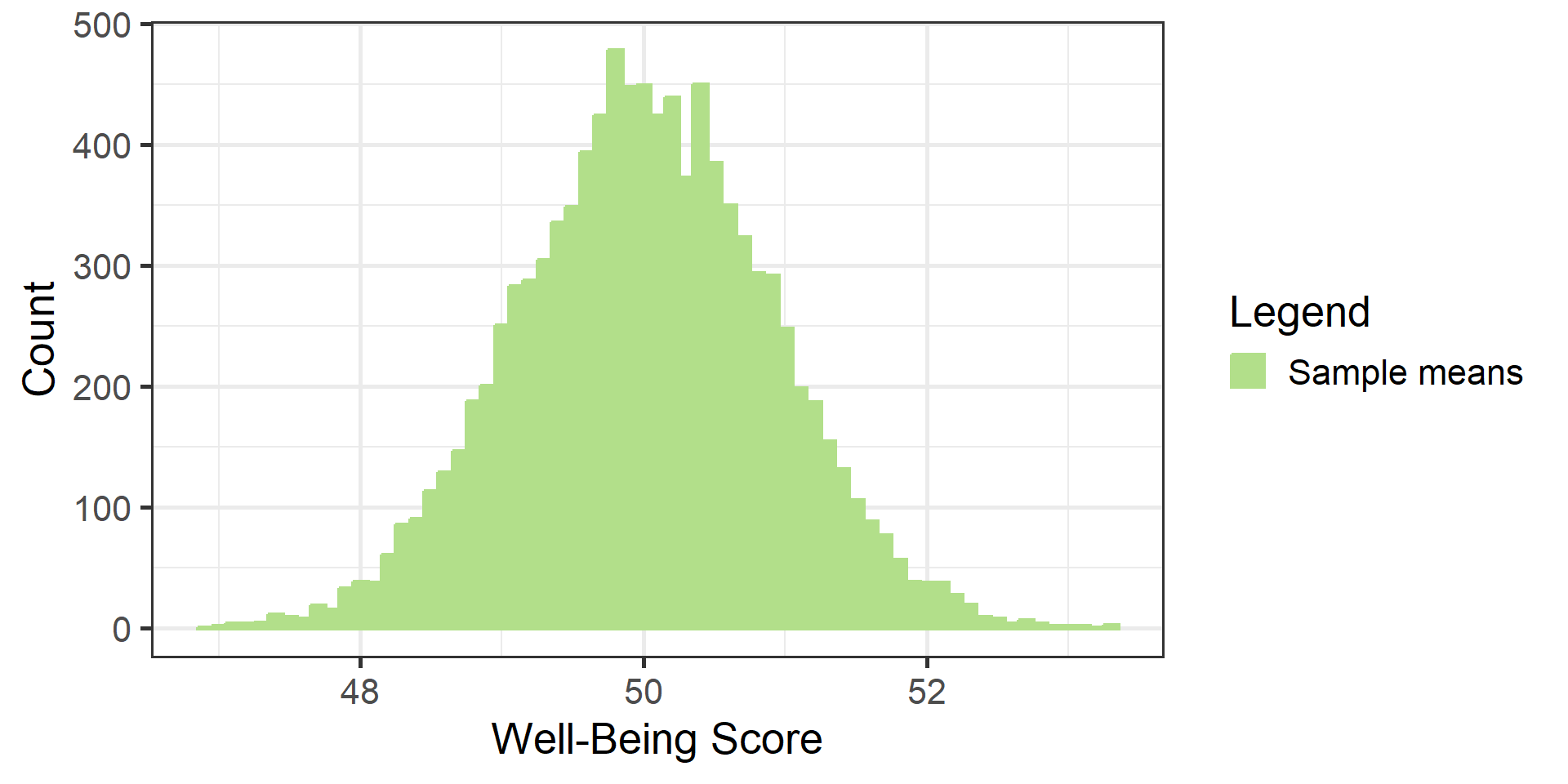
Imagine \(\mu = 50\) and \(\sigma^2 = 25\)

If true, pretend we can do the following:

  1. Obtain a sample of \(n=30\) and record the mean well-being score.
  2. Repeat Step 1 many (e.g., ten-thousand) times.
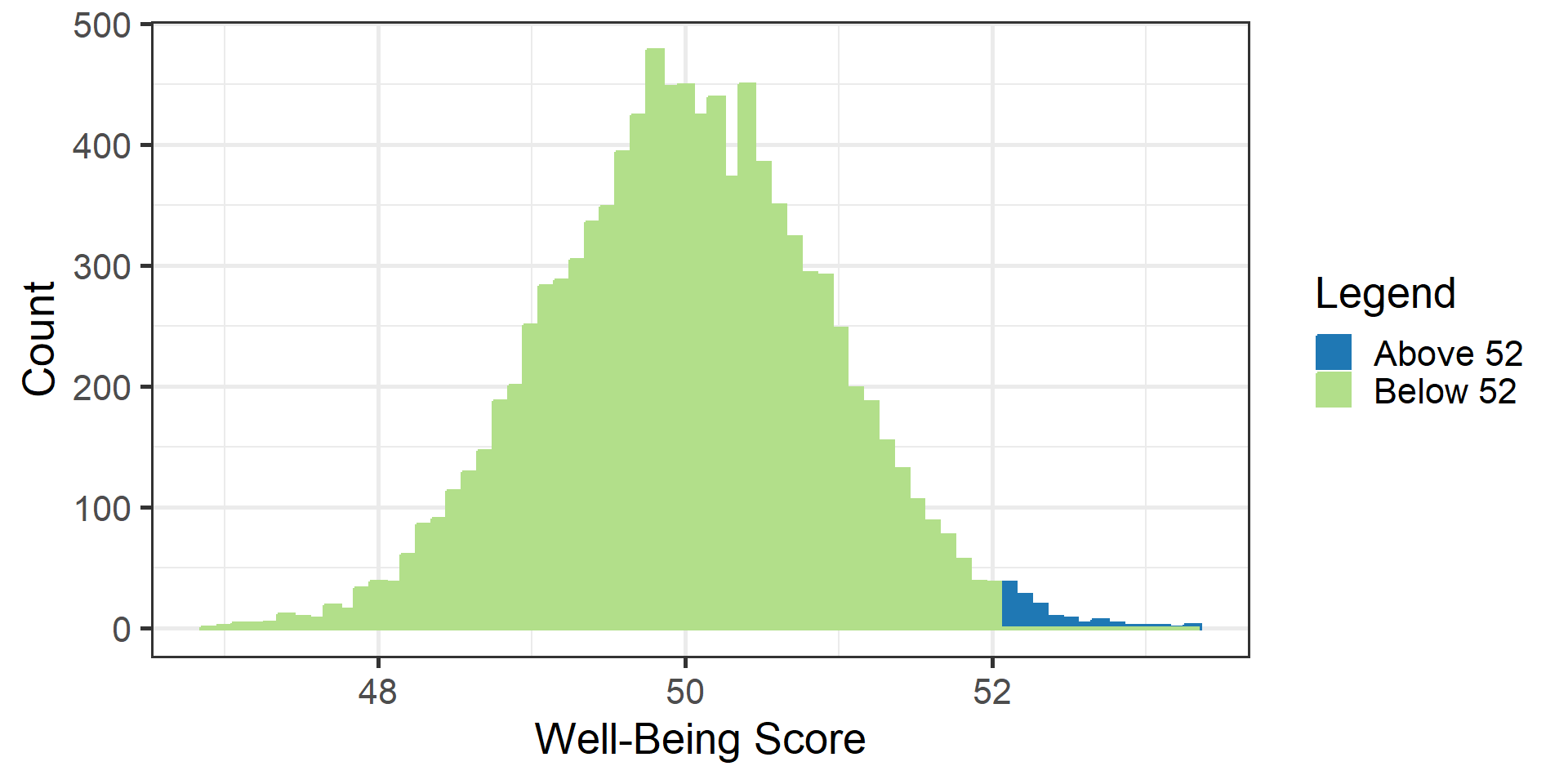
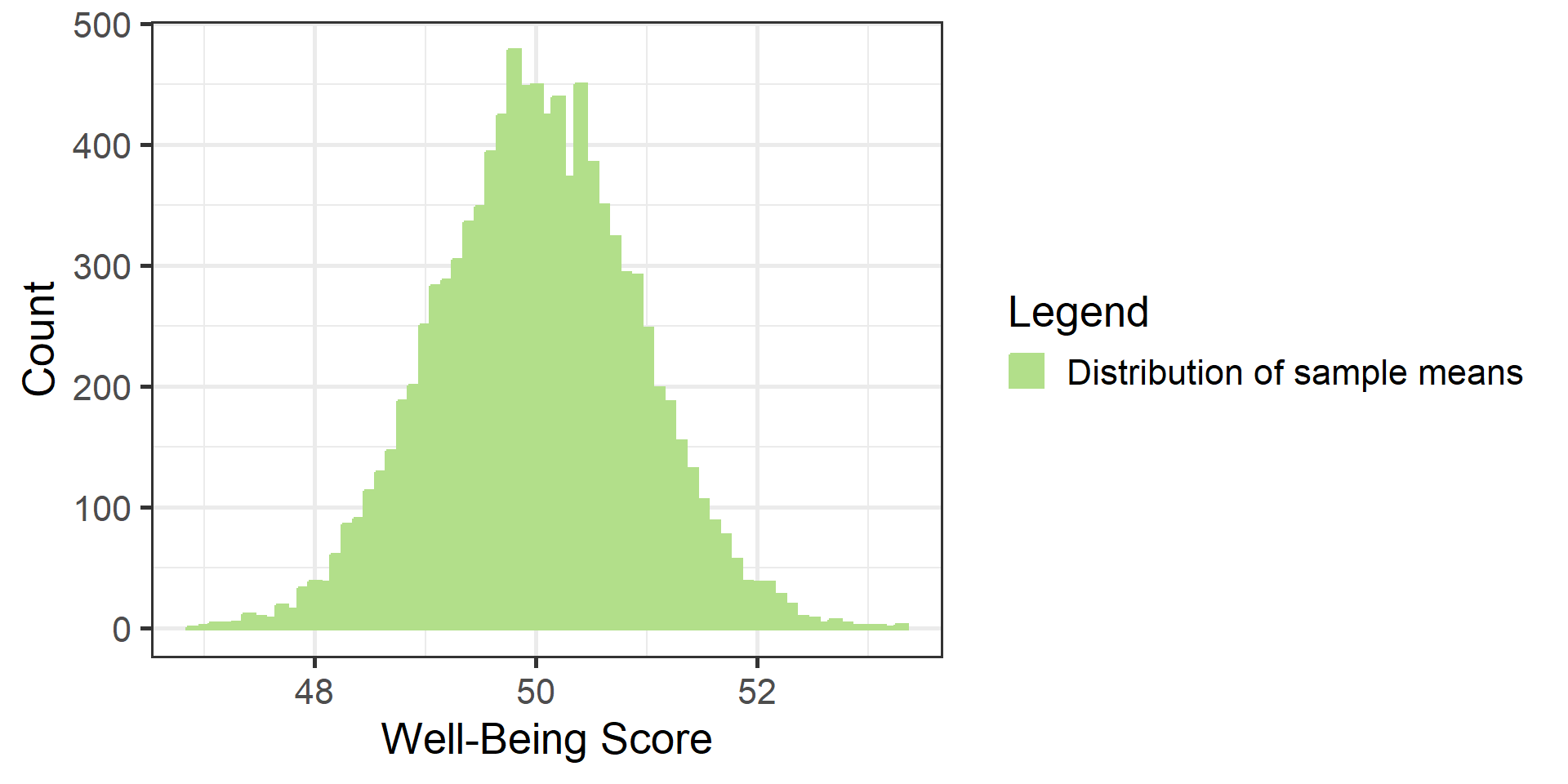
  3. Plot the distribution of the sample means:
  • What special name does this distribution have?

Sampling distribution of the mean

  • Was this distribution created assuming \(H_0\) is true?

Yes, under this thought experiment, we assumed \(\mu = 50\); its standard deviation (i.e., standard error) is \(\sqrt{25/30} \approx .913\)

Sampling distribution

  • Suppose we want to know how many sample means are above 52. How can we know?

Count the number of sample means with a well-being score above 52. In this case, there are 129 out of 10,000 sample means above 52. We can represent this number as a percentage (1.29%) or proportion (.0129).

Sampling distribution cut-offs

#| '!! shinylive warning !!': |
#|   shinylive does not work in self-contained HTML documents.
#|   Please set `embed-resources: false` in your metadata.
#| standalone: true
#| panel: fill
#| fig-align: center
#| viewerHeight: 600
library(tibble)
library(munsell)
library(shiny)
library(ggplot2)

ui <- fluidPage(
  plotOutput(outputId = "sampDistPlot"),
  sliderInput("cutoff", "Cut-off:", min = 48, max = 52, value = 51, step = 1)
)

server <- function(input, output) {
  theme_minimalism <- function(base_size = 20) {
    theme_minimal(base_size = base_size) + # ggplot's minimal theme hides many unnecessary features of plot
      theme(
        # make modifications to the theme
        panel.grid.major.y = element_blank(), # hide major grid for y axis
        panel.grid.minor.y = element_blank(), # hide minor grid for y axis
        panel.grid.major.x = element_blank(), # hide major grid for x axis
        panel.grid.minor.x = element_blank(), # hide minor grid for x axis
        #text=element_text(size=14),           # font aesthetics
        #axis.text=element_text(size=12),
        #axis.title=element_text(size=14,face="bold"))
        axis.title = element_text(face = "bold")
      )
  }

  output$sampDistPlot <- renderPlot({
    lower <- 47
    upper <- 53
    mu <- 50
    #stdev <- 5

    set.seed(1234) #So we get the same results as above
    dat <- round(rnorm(10000, 50, sqrt(25 / 30)), 1)

    sampdist <- data.frame(x = dat) #Converts the above to a dataframe
    #sampdist <- sampdist %>% dplyr::mutate(aboveCutoff = ifelse(x > input$cutoff, T,F)) #Adds a column counting if a given value is Above or Below the Sample Mean
    sampdist <- sampdist %>%
      dplyr::mutate(
        aboveCutoff = ifelse(x > input$cutoff, "Above Cut-off", "Below Cut-off")
      ) #Adds a column counting if a given value is Above or Below the Sample Mean
    percent <- (length(which(sampdist$aboveCutoff == "Above Cut-off")) /
      10000) *
      100

    ggplot(data = sampdist, aes(x, color = aboveCutoff, fill = aboveCutoff)) +
      geom_histogram(binwidth = .1) +
      annotate(
        "text",
        x = 51,
        y = 1200,
        label = paste0(
          percent,
          "% of the distribution \n has a sample mean above ",
          input$cutoff
        ),
        vjust = 1,
        hjust = 1
      ) +
      ylab("Count") +
      xlab("Well-Being Score") +
      #Sets the x axis ticks to cover the whole plot
      scale_x_continuous(
        limits = c(lower, upper),
        breaks = seq(round(lower), round(upper), by = 1)
      ) +
      #Clears the y-axis ticks
      scale_color_manual("aboveCutoff", values = c("#1F78B4", "#b2df8a")) +
      scale_fill_manual("aboveCutoff", values = c("#1F78B4", "#b2df8a")) +
      scale_y_continuous(breaks = NULL) +
      theme_bw(base_size = 20) +
      theme(legend.title = element_blank())
    #theme_minimalism()
  })
}

shinyApp(ui, server)

Try adjusting the sample mean cut-off.

Sampling distribution

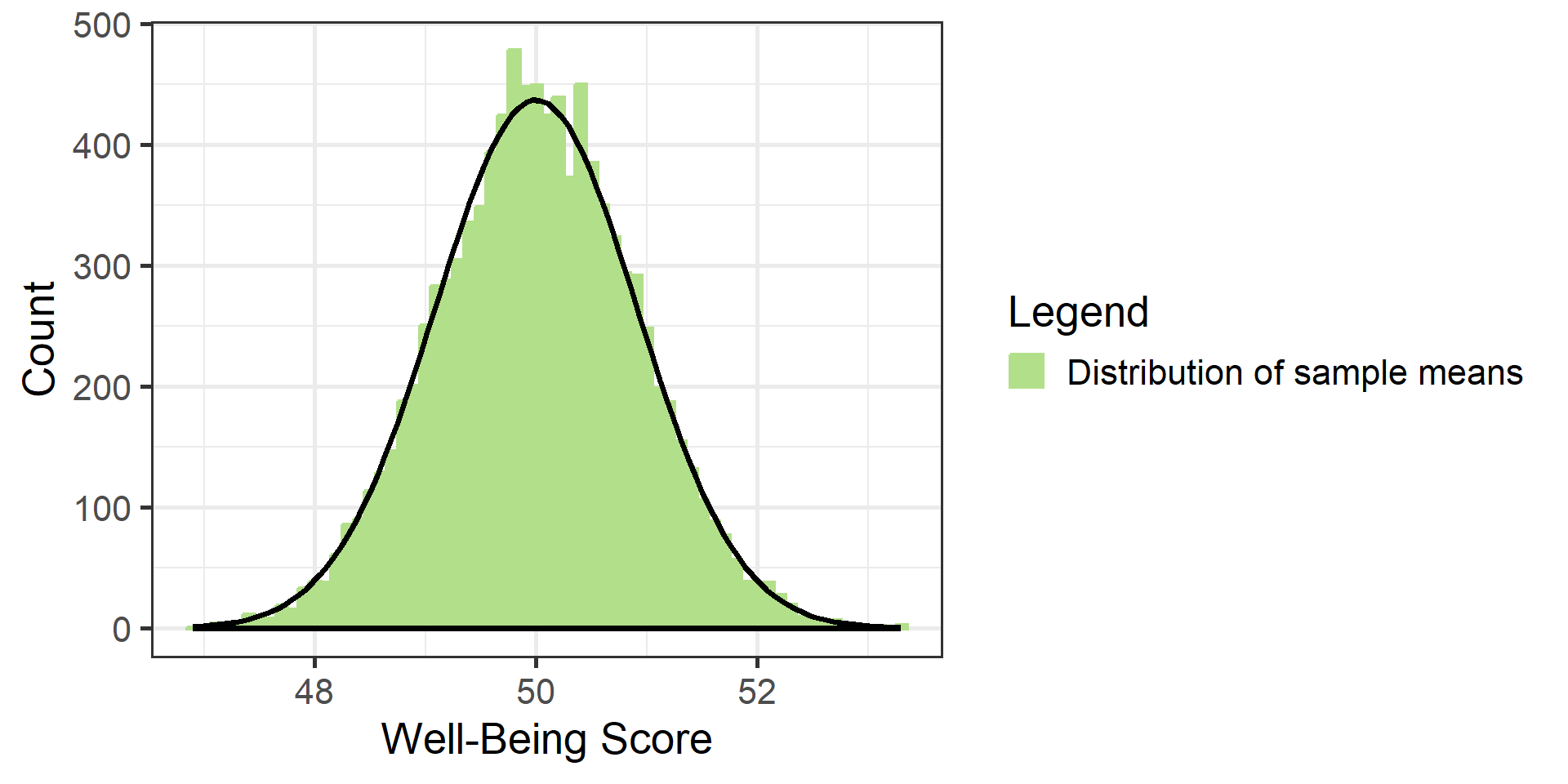
  • Assuming the central limit theorem holds, what shape does this distribution have?

Normal. That the sampling distribution of the mean is normal will be useful when we later conduct hypothesis testing.

Normal. We do not need to hypothetically conduct many experiments. Given the mean and variance of the population, statisticians have figured out the shape of the sampling distribution and the proportion of means above/below any value.

Review: Normal distribution

Scroll down for a review of the normal distribution, or advance to the right to skip

Normal distribution

  • A normal distribution is a probability distribution
    • If scores follow a normal distribution, it tells us the probability of observing certain scores (or ranges of scores)
  • The shape of a normal distribution is fully described by just two numbers:
    • Mean
    • Variance (or standard deviation)

Normal distribution

Try changing the mean and variance to see how the distribution changes:

#| '!! shinylive warning !!': |
#|   shinylive does not work in self-contained HTML documents.
#|   Please set `embed-resources: false` in your metadata.
#| standalone: true
#| panel: fill
#| fig-align: center
#| viewerHeight: 650
library(tibble)
library(munsell)
library(shiny)
library(ggplot2)

ui <- fluidPage(
  plotOutput(outputId = "normalDistPlot1"),
  sliderInput("normalmean", "Mean:", min = 40, max = 60, value = 50, step = 1),
  sliderInput("normalvar", "Variance:", min = 10, max = 40, value = 25, step = 1)
)

server <- function(input, output){
  output$normalDistPlot1 <- renderPlot({
    p <- ggplot(data.frame(x = c(25, 75)), aes(x = x)) +
      xlim(25, 75) +
      ylim(0, .15) +
  
      stat_function(
        fun = dnorm,
        args = list(mean = input$normalmean, sd = sqrt(input$normalvar)),
        geom = "area",
        fill = "#b2df8a"
      ) +
      stat_function(
        fun = dnorm,
        args = list(mean = input$normalmean, sd = sqrt(input$normalvar))
      ) +
  
      labs(x = "\n X", y = "density \n") +
      theme_bw(base_size = 19)
    p
  })
}

shinyApp(ui, server)

Standard normal distribution

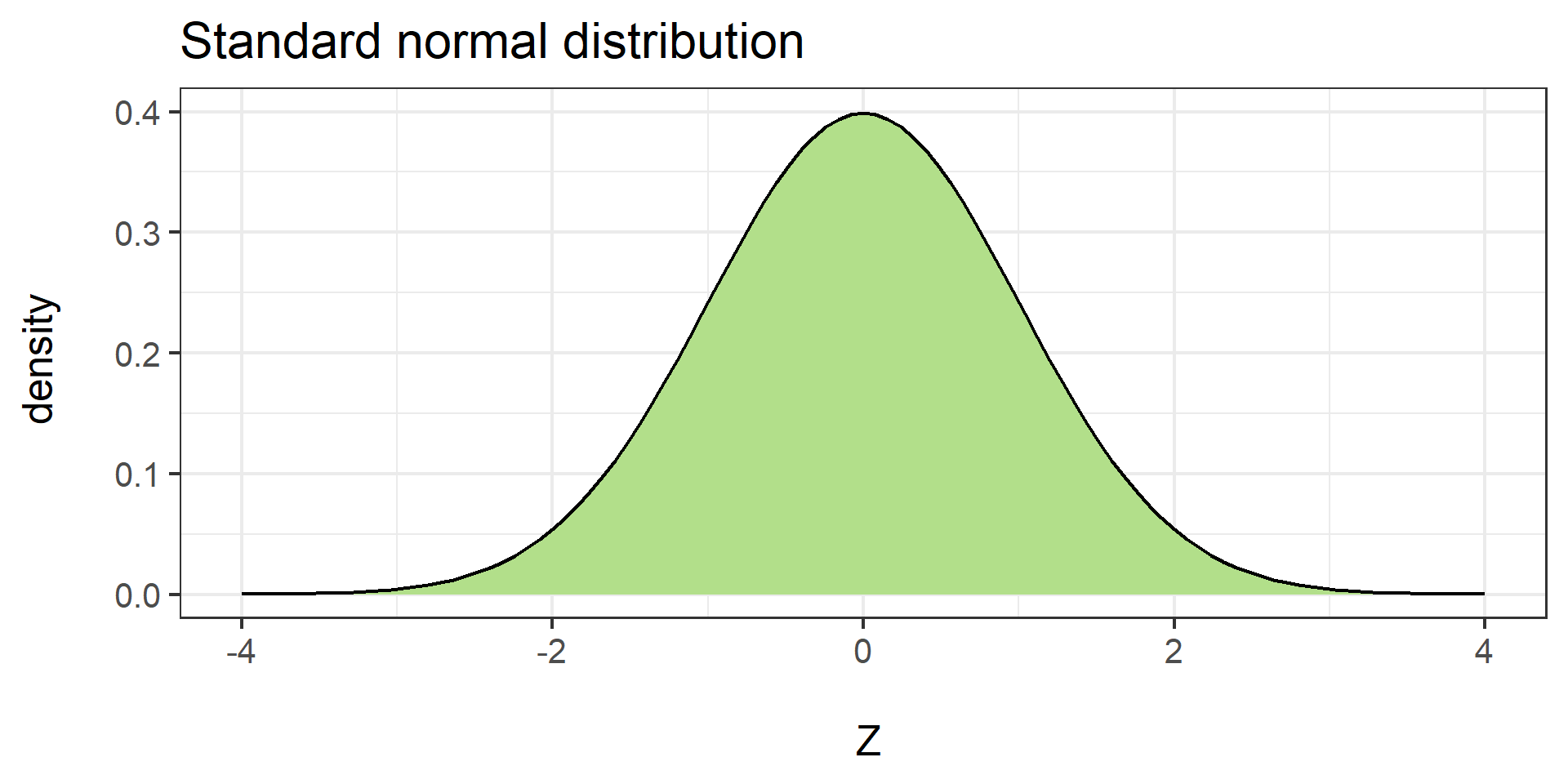
A standard normal distribution is a special case of the normal distribution with:

  • Mean = 0
  • Variance = 1 (or equivalently, standard deviation = 1)

A standard normal distribution is often referenced in hypothesis testing

  • You may have seen a “Z table” that has values of this distribution with the proportion in one or both tails
  • Examples are provided on the next slides

Standard normal distribution

The table below has pairs of values:

  • Z: a value along the x-axis of a standard normal distribution
  • prop: the proportion in the right-hand tail of the distribution
Z prop Z prop Z prop Z prop
-2.0 0.977 -1.0 0.841 0.0 0.500 1.0 0.159
-1.9 0.971 -0.9 0.816 0.1 0.460 1.1 0.136
-1.8 0.964 -0.8 0.788 0.2 0.421 1.2 0.115
-1.7 0.955 -0.7 0.758 0.3 0.382 1.3 0.097
-1.6 0.945 -0.6 0.726 0.4 0.345 1.4 0.081
-1.5 0.933 -0.5 0.691 0.5 0.309 1.5 0.067
-1.4 0.919 -0.4 0.655 0.6 0.274 1.6 0.055
-1.3 0.903 -0.3 0.618 0.7 0.242 1.7 0.045
-1.2 0.885 -0.2 0.579 0.8 0.212 1.8 0.036
-1.1 0.864 -0.1 0.540 0.9 0.184 1.9 0.029

Example: 18.4% of the distribution greater than 0.9; thus we can infer that 81.6% of the distribution is less than 0.9.

Standard normal distribution

The table below has pairs of values:

  • Z: a value along the x-axis of a standard normal distribution
  • prop: the proportion in the left-hand tail of the distribution
Z prop Z prop Z prop Z prop
-2.0 0.023 -1.0 0.159 0.0 0.500 1.0 0.841
-1.9 0.029 -0.9 0.184 0.1 0.540 1.1 0.864
-1.8 0.036 -0.8 0.212 0.2 0.579 1.2 0.885
-1.7 0.045 -0.7 0.242 0.3 0.618 1.3 0.903
-1.6 0.055 -0.6 0.274 0.4 0.655 1.4 0.919
-1.5 0.067 -0.5 0.309 0.5 0.691 1.5 0.933
-1.4 0.081 -0.4 0.345 0.6 0.726 1.6 0.945
-1.3 0.097 -0.3 0.382 0.7 0.758 1.7 0.955
-1.2 0.115 -0.2 0.421 0.8 0.788 1.8 0.964
-1.1 0.136 -0.1 0.460 0.9 0.816 1.9 0.971

Example: 81.6% of the distribution less than 0.9; thus we can infer that 18.4% of the distribution is greater than 0.9.

Standard normal distribution

To visualize Z values and the proportion in the tail, change the values or tail below:

#| '!! shinylive warning !!': |
#|   shinylive does not work in self-contained HTML documents.
#|   Please set `embed-resources: false` in your metadata.
#| standalone: true
#| panel: fill
#| fig-align: center
#| viewerHeight: 600
library(tibble)
library(munsell)
library(shiny)
library(ggplot2)

ui <- fluidPage(
  plotOutput(outputId = "normalDistPlot3"),
  numericInput(
    "normalcutoff2",
    "Z cutoff value:",
    min = -3,
    max = 3,
    value = 1,
    step = .05
  ),
  radioButtons(
    "normaltail2",
    "Choose a tail:",
    choices = c("Upper Tail", "Lower Tail")
  )
)

server <- function(input, output){
  output$normalDistPlot3 <- renderPlot({
    prop <- ifelse(
      input$normaltail2 == "Upper Tail",
      round(pnorm(input$normalcutoff2, lower.tail = FALSE), 3),
      round(pnorm(input$normalcutoff2, lower.tail = TRUE), 3)
    )
  
    p <- ggplot(data.frame(x = c(-4, 4)), aes(x = x)) +
      xlim(-4, 4) +
      ylim(0, .5) +
  
      stat_function(fun = dnorm)
  
    if (input$normaltail2 == "Upper Tail") {
      p <- p +
        stat_function(
          fun = dnorm,
          geom = "area",
          fill = "#b2df8a",
          xlim = c(-4, input$normalcutoff2)
        ) +
        stat_function(
          fun = dnorm,
          geom = "area",
          fill = "#1F78B4",
          xlim = c(input$normalcutoff2, 4)
        ) +
        geom_text(label = paste0("Proportion: ", prop), x = 3, y = .3)
    } else if (input$normaltail2 == "Lower Tail") {
      p <- p +
        stat_function(
          fun = dnorm,
          geom = "area",
          fill = "#1F78B4",
          xlim = c(-4, input$normalcutoff2)
        ) +
        stat_function(
          fun = dnorm,
          geom = "area",
          fill = "#b2df8a",
          xlim = c(input$normalcutoff2, 4)
        ) +
        geom_text(label = paste0("Proportion: ", prop), x = -3, y = .3)
    }
  
    p <- p +
      geom_vline(xintercept = input$normalcutoff2, color = "black") +
      labs(x = "\n z", y = "density \n") +
      theme_bw(base_size = 22) +
      geom_text(
        label = paste0("Cutoff: ", input$normalcutoff2),
        x = input$normalcutoff2 - .7,
        y = .45
      )
  
    p
  })
}

shinyApp(ui, server)

Learning check

Based on either a Z-table or the app on the slide above…

  • What proportion of scores are above Z = 1.30?

Answer: .097 or 9.7%

  • What proportion of scores are below Z = -1.20?

Answer: .115 or 11.5%

  • What proportion of scores are between Z = -1.8 and Z = 1.8?

Answer: This one is a little more challenging. Recall that proportions range from 0 to 1; the proportion of the entire distribution is equal to 1. Since .036 is less than Z = -1.8, and .036 is above Z = 1.8, then the proportion between these two values is: 1 - .036 - .036 = .928.

Review: Standardized (Z) scores

Scroll down for a review of standardized (Z) scores, or advance to the right to skip

Standardizing a single score

What if we sample a single observation and obtain a score of \(X = 58\)?

  • Is that a large value? A small value?

If we knew how \(X = 58\) compared to other scores, we could answer such questions

  • Standardized scores, or Z-scores, can help us compare \(X=58\) to some distribution of other scores

Standardized (Z) scores

To compute a Z-score, we need to know something about the distribution of other scores:

  • The mean
  • The standard deviation (or variance)

The score can then be standardized:

\[\begin{align*} Z = \frac{\text{score - mean}}{\text{standard deviation}} \end{align*}\]

Standardized (Z) scores

As an example, pretend:

  • \(X = 58\)
  • We compare \(X\) to a distribution of scores with \(\text{mean} = 50\) and \(\text{standard deviation} = 5\)

Then,

\[\begin{align*} Z = \frac{\text{score - mean}}{\text{standard deviation}} = \frac{58-50}{5} = 1.6 \end{align*}\]

To interpret the Z-score for this observation, we can say that \(X\) is 1.6 standard deviations above the mean of the other scores

Standardizing a normal distribution

Interpreting Z-scores is easier if the entire distribution of other scores follows a normal distribution

  • We can reference a Z-table or an app that tells us the proportion of scores below or above a particular Z-score

Standard normal distribution

To visualize Z values and the proportion in the tail, change the values or tail below:

#| '!! shinylive warning !!': |
#|   shinylive does not work in self-contained HTML documents.
#|   Please set `embed-resources: false` in your metadata.
#| standalone: true
#| panel: fill
#| fig-align: center
#| viewerHeight: 600
library(tibble)
library(munsell)
library(shiny)
library(ggplot2)

ui <- fluidPage(
  plotOutput(outputId = "normalDistPlot2"),
  numericInput(
    "normalcutoff",
    "Z cutoff value:",
    min = -3,
    max = 3,
    value = 1,
    step = .05
  ),
  radioButtons(
    "normaltail",
    "Choose a tail:",
    choices = c("Upper Tail", "Lower Tail")
  )
)

server <- function(input, output){
  output$normalDistPlot2 <- renderPlot({
    prop <- ifelse(
      input$normaltail == "Upper Tail",
      round(pnorm(input$normalcutoff, lower.tail = FALSE), 3),
      round(pnorm(input$normalcutoff, lower.tail = TRUE), 3)
    )
  
    p <- ggplot(data.frame(x = c(-4, 4)), aes(x = x)) +
      xlim(-4, 4) +
      ylim(0, .5) +
  
      stat_function(fun = dnorm)
  
    if (input$normaltail == "Upper Tail") {
      p <- p +
        stat_function(
          fun = dnorm,
          geom = "area",
          fill = "#b2df8a",
          xlim = c(-4, input$normalcutoff)
        ) +
        stat_function(
          fun = dnorm,
          geom = "area",
          fill = "#1F78B4",
          xlim = c(input$normalcutoff, 4)
        ) +
        geom_text(label = paste0("Proportion: ", prop), x = 3, y = .3)
    } else if (input$normaltail == "Lower Tail") {
      p <- p +
        stat_function(
          fun = dnorm,
          geom = "area",
          fill = "#1F78B4",
          xlim = c(-4, input$normalcutoff)
        ) +
        stat_function(
          fun = dnorm,
          geom = "area",
          fill = "#b2df8a",
          xlim = c(input$normalcutoff, 4)
        ) +
        geom_text(label = paste0("Proportion: ", prop), x = -3, y = .3)
    }
  
    p <- p +
      geom_vline(xintercept = input$normalcutoff, color = "black") +
      labs(x = "\n z", y = "density \n") +
      theme_bw(base_size = 22) +
      geom_text(
        label = paste0("Cutoff: ", input$normalcutoff),
        x = input$normalcutoff - .7,
        y = .45
      )
  
    p
  })
}

shinyApp(ui, server)

Learning check

  • What proportion of scores from a normal distribution are above 1.6?

Answer: 0.055 or 5.5% of scores are above Z = 1.6

  • What Z score would be obtained for \(X = 45\) with \(\text{mean} = 50\) and \(\text{Standard deviation} = 10\)?
  • What proportion of scores from a normal distribution are below this value?

Answer: \(Z = \frac{45-50}{10} = -.5\), with .309 or 30.9% of scores below this value

Unstandardized to Standardized

Standardization does not change the relative order of a set of scores

To see this, the app on the next slide

  • Simulates 20,000 values for any chosen mean and standard deviation
  • Unstandardized scores are on the left
  • Standardized scores are on the right

Unstandardized to Standardized

#| '!! shinylive warning !!': |
#|   shinylive does not work in self-contained HTML documents.
#|   Please set `embed-resources: false` in your metadata.
#| standalone: true
#| panel: fill
#| fig-align: center
#| viewerHeight: 650
library(tibble)
library(munsell)
library(shiny)
library(ggplot2)

theme_minimalism <- function(base_size = 20) {
  theme_minimal(base_size = base_size) + # ggplot's minimal theme hides many unnecessary features of plot
    theme(
      # make modifications to the theme
      panel.grid.major.y = element_blank(), # hide major grid for y axis
      panel.grid.minor.y = element_blank(), # hide minor grid for y axis
      panel.grid.major.x = element_blank(), # hide major grid for x axis
      panel.grid.minor.x = element_blank(), # hide minor grid for x axis
      #text=element_text(size=14),           # font aesthetics
      #axis.text=element_text(size=12),
      #axis.title=element_text(size=14,face="bold"))
      axis.title = element_text(face = "bold")
    )
}

ui <- fluidPage(
  fluidRow(
    column(width = 6,
           plotOutput(outputId = "zScorePlot2")),
    column(width = 6,
           plotOutput(outputId = "zScorePlot3"))
  ),
  sliderInput(
      "mu2",
      "Distribution Mean",
      min = 40,
      max = 60,
      value = 50,
      step = 1
  ),
  sliderInput(
      "stdev2",
      "Distribution SD",
      min = 4,
      max = 6,
      value = 5,
      step = .25
  )
)


server <- function(input, output){
  # If we were to simulate the data;
  # alternative is to just use dnorm
  datstd <- reactive({
    set.seed(runif(1, 1000 + input$mu2 + input$stdev2, 2000))
    #set.seed(4567)
    raw = rnorm(20000, mean = input$mu2, sd = input$stdev2)
    standardized = scale(raw)
    data.frame(raw, standardized)
  })
  
  output$zScorePlot2 <- renderPlot({
    lower <- 50 - 3 * input$stdev2
    upper <- 50 + 3 * input$stdev2
  
    dat <- datstd()
    ggplot(
      data = dat,
      aes(
        raw,
        colour = "Distribution of Sample means",
        fill = "Distribution of Sample means"
      )
    ) +
      #geom_histogram(bins = length(unique(round(dat$raw,0)))) +
      geom_histogram(bins = 50) +
      annotate(
        "text",
        x = Inf,
        y = Inf,
        label = paste0(
          "Distribution Mean = ",
          input$mu2,
          " \n Distribution SD = ",
          input$stdev2
        ),
        vjust = 1,
        hjust = 1
      ) +
      ylab("Count") +
      xlab("Well-Being Score") +
      #Sets the x axis ticks to cover the whole plot
      scale_x_continuous(
        limits = c(lower, upper),
        breaks = seq(round(lower), round(upper), by = input$stdev2)
      ) +
      scale_colour_manual("Legend", values = c("#b2df8a")) +
      scale_fill_manual("Legend", values = c("#b2df8a")) +
      #Clears the y-axis ticks
      scale_y_continuous(breaks = NULL) +
      theme_minimalism() +
      theme(legend.position = "none") +
      xlim(25, 75) +
      ylim(0, 2200)
  })
  
  output$zScorePlot3 <- renderPlot({
    lower <- -3
    upper <- 3
    dat <- datstd()
    ggplot(
      data = dat,
      aes(
        standardized,
        colour = "Distribution of (Standardized) \n Sample means",
        fill = "Distribution of (Standardized) \n Sample means"
      )
    ) +
      #geom_histogram(bins = length(unique(round(dat$raw,0)))) +
      geom_histogram(bins = 50) +
      annotate(
        "text",
        x = Inf,
        y = Inf,
        label = paste0("Distribution Mean = ", 0, " \n Distribution SD = ", 1),
        vjust = 1,
        hjust = 1
      ) +
      #Clears the y-axis label
      ylab("Count") +
      xlab("Well-Being Score (Standardized)") +
      #Sets the x axis ticks to cover the whole plot
      scale_x_continuous(
        limits = c(lower, upper),
        breaks = seq(round(lower), round(upper), by = 1)
      ) +
      #Clears the y-axis ticks
      scale_y_continuous(breaks = NULL) +
      scale_colour_manual("Legend", values = c("#b2df8a")) +
      scale_fill_manual("Legend", values = c("#b2df8a")) +
      theme_minimalism() +
      theme(legend.position = "none") +
      ylim(0, 2200)
  })
}

shinyApp(ui, server)

Unstandardized to Standardized

  • Regardless of the mean and standard deviation of the unstandardized scores, what will the mean and standard deviation be for the standardized scores?

The standardized distribution will always have a mean of 0 and standard deviation of 1

Sampling distribution of \(\bar{x}\) under \(H_0\)

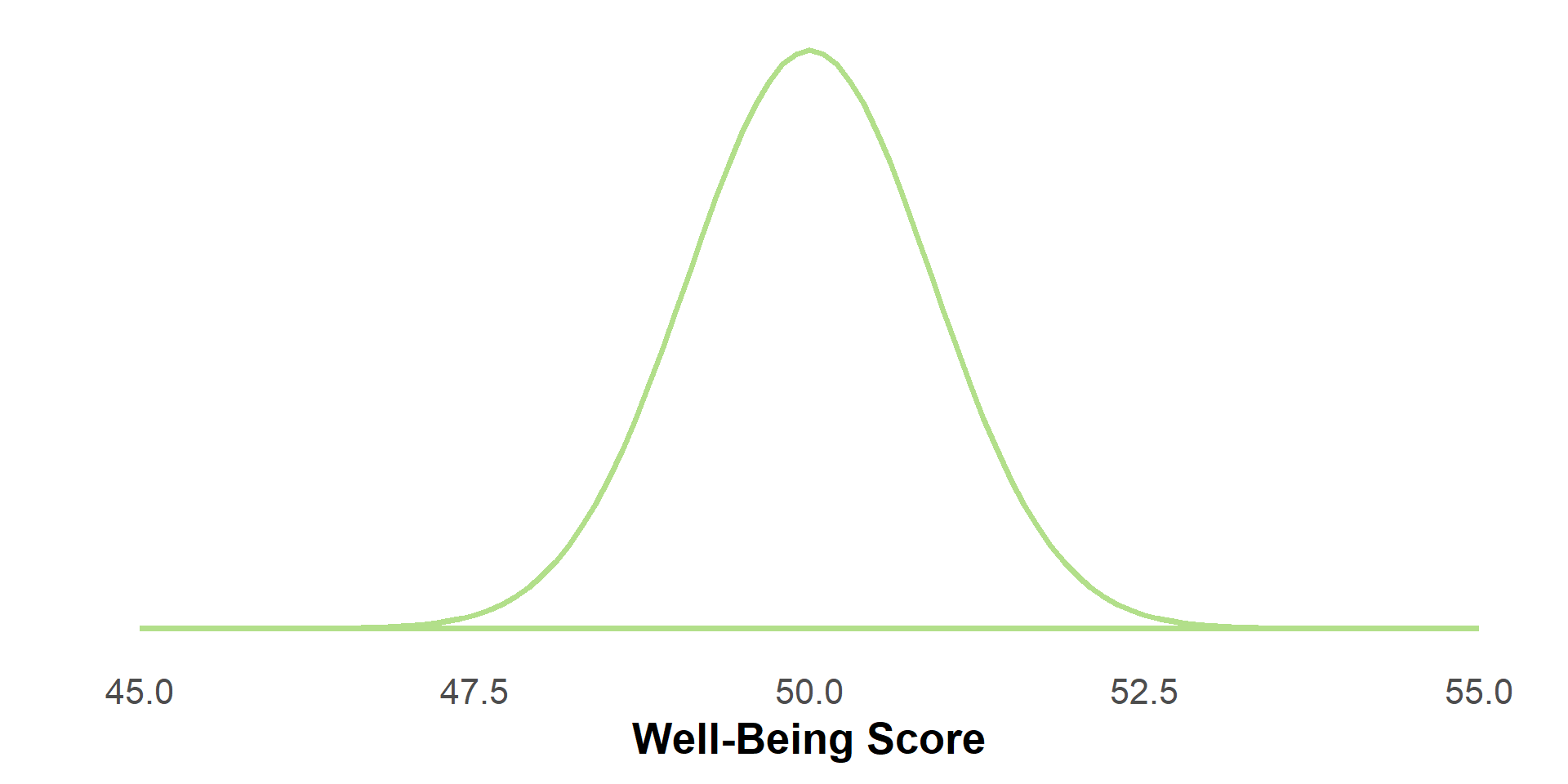
  • Under \(H_0: \mu = 50\)
    • The mean of the sampling distribution is 50
  • With assumed \(\sigma^2 = 25\) in the population and \(n=30\)
    • The standard deviation of the sampling distribution is \(\sqrt{25/n} = 5/\sqrt{30} \approx .913\)
  • If the assumptions of the central limit theorem hold…
    • This distribution is normal

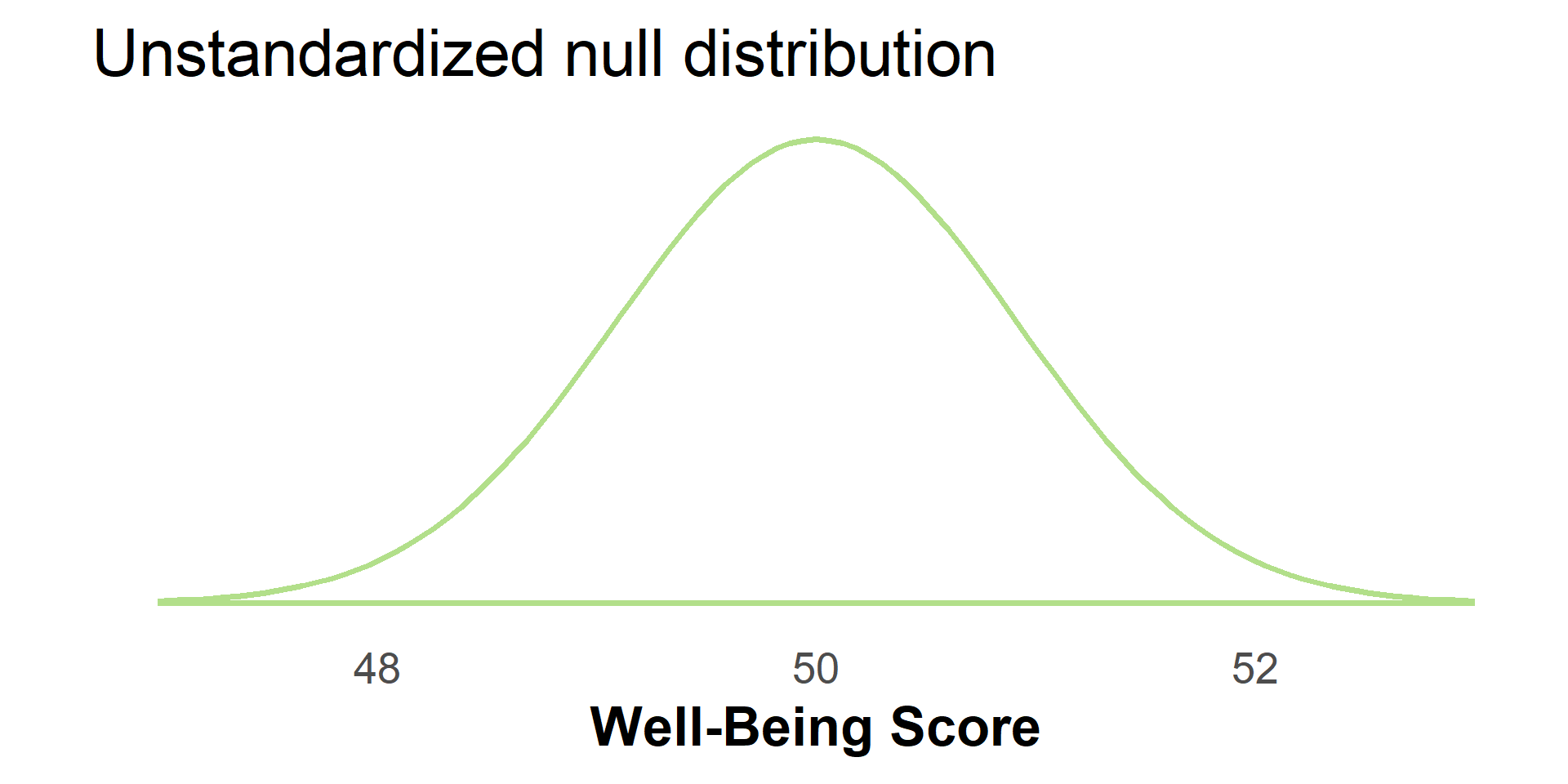
Sampling distribution of \(\bar{x}\) under \(H_0\)

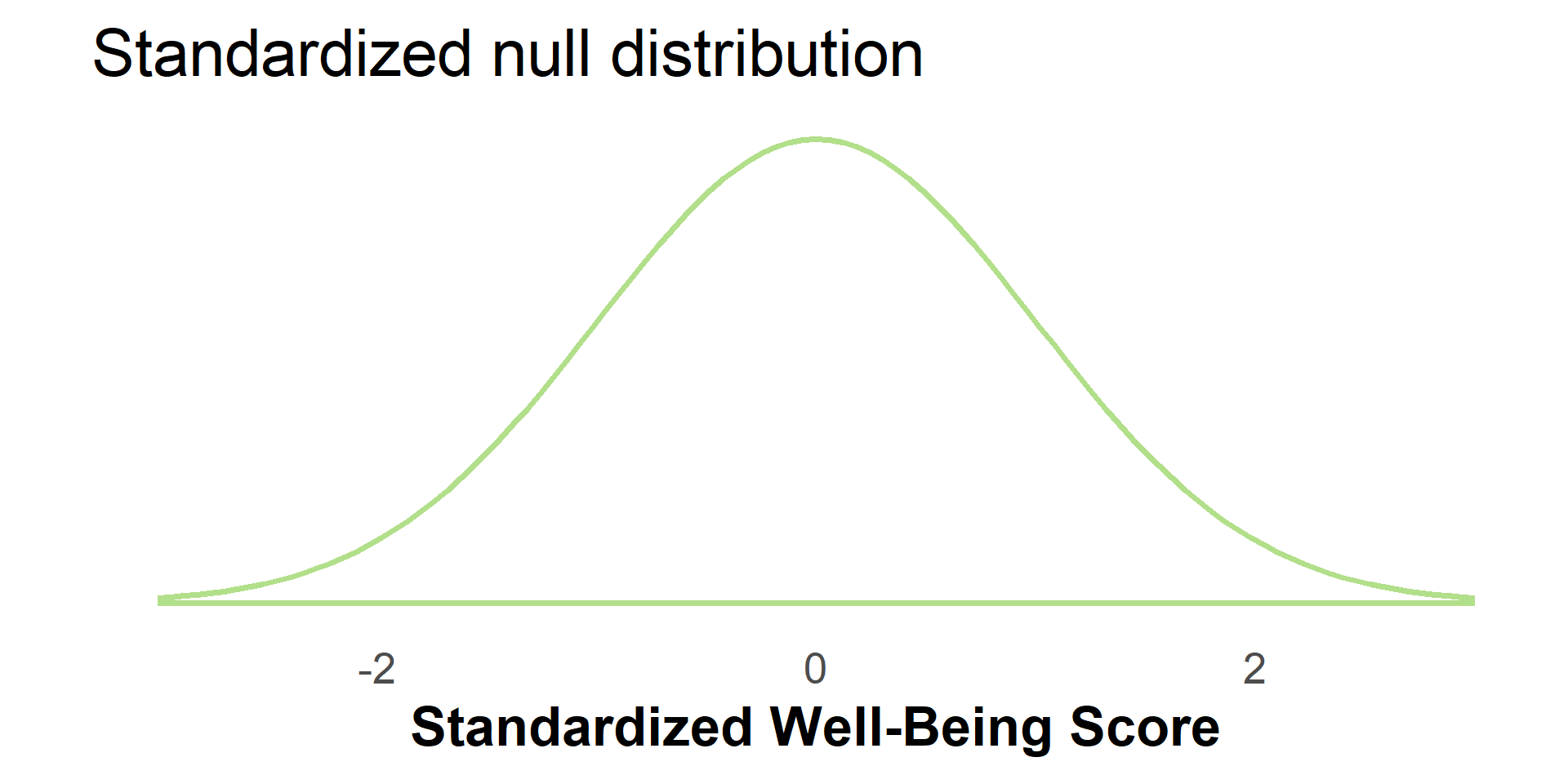
Standardizing the sampling distribution

We will work with a standardized version of the sampling distribution under \(H_0\)

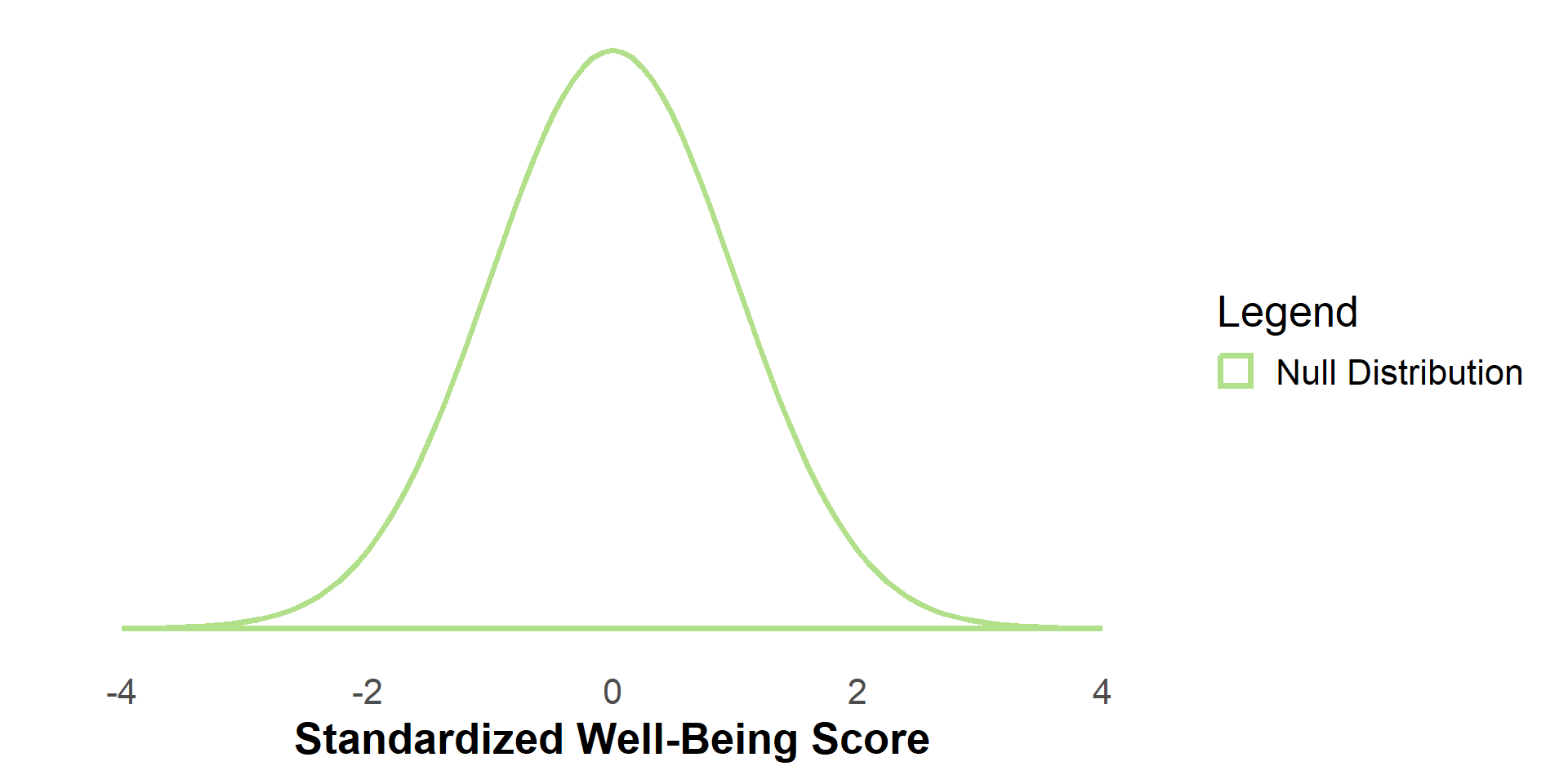
For short, call this the null distribution

Standardizing the sample mean

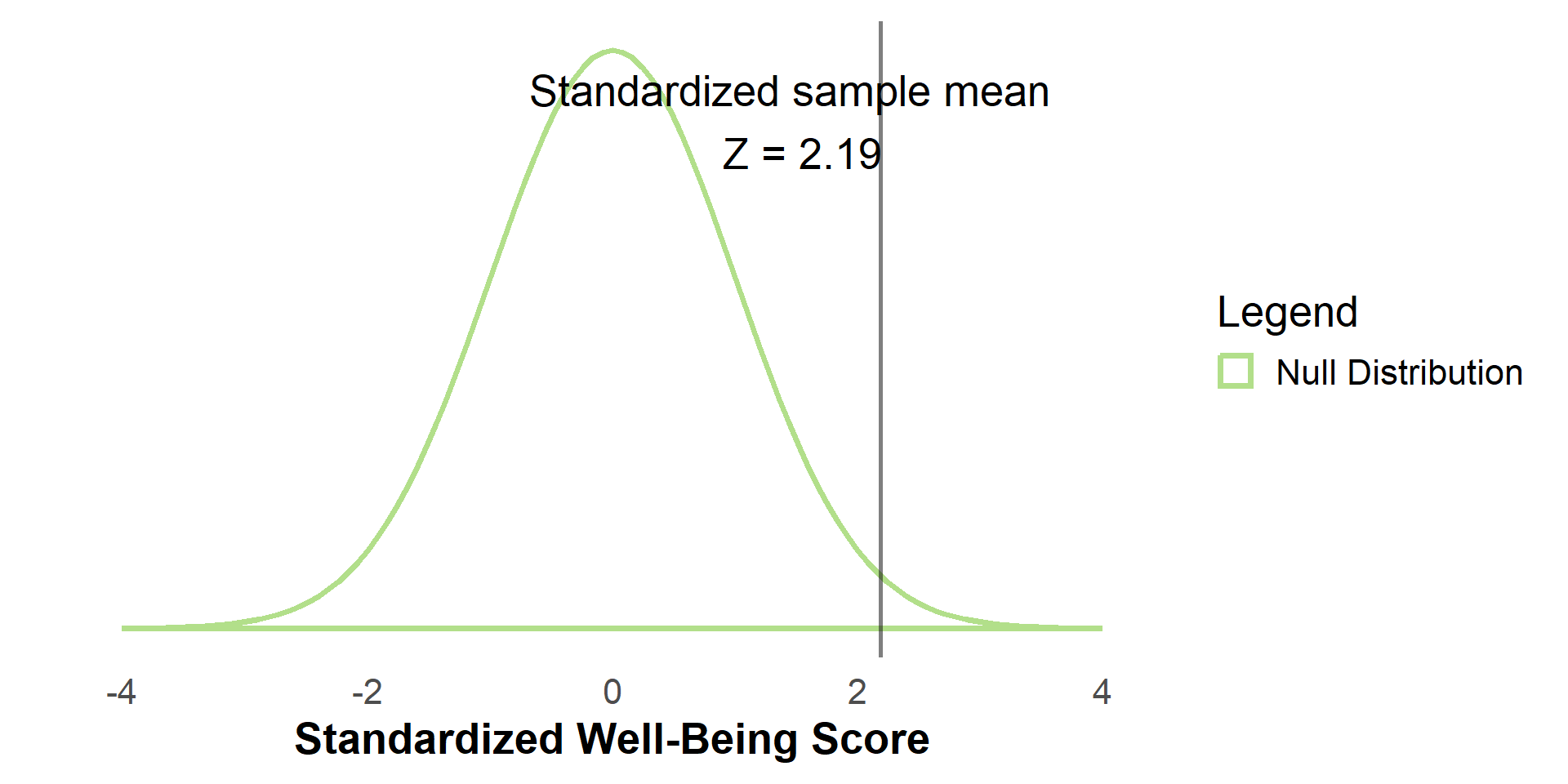
We also standardized the sample mean, \(\bar{x} = 52\), with respect to the mean and standard deviation (i.e., standard error) of the null distribution:

\[\begin{align*} Z = \frac{\text{value} - \text{distribution mean}}{\text{standard deviation}} = \frac{52 - 50}{.913} = 2.19 \end{align*}\]

\(Z = 2.19\) is the obtained test statistic for our sample

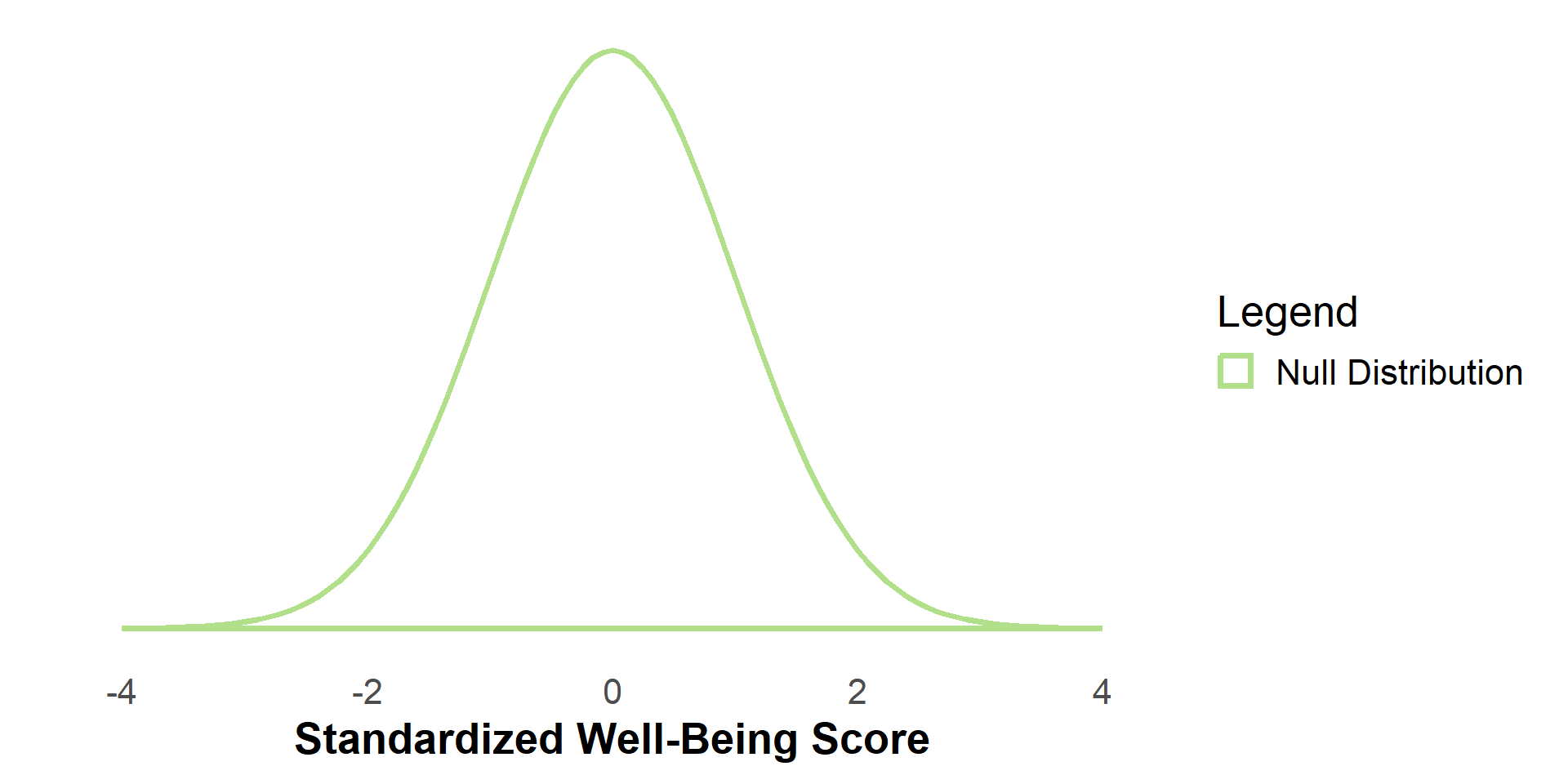
The Null Distribution

This is the Null Sampling Distribution - what the sampling distribution would look like if \(H_0\) were true.

Note: If this plot or any subsequent plots look odd, try refreshing the page in your web browser.

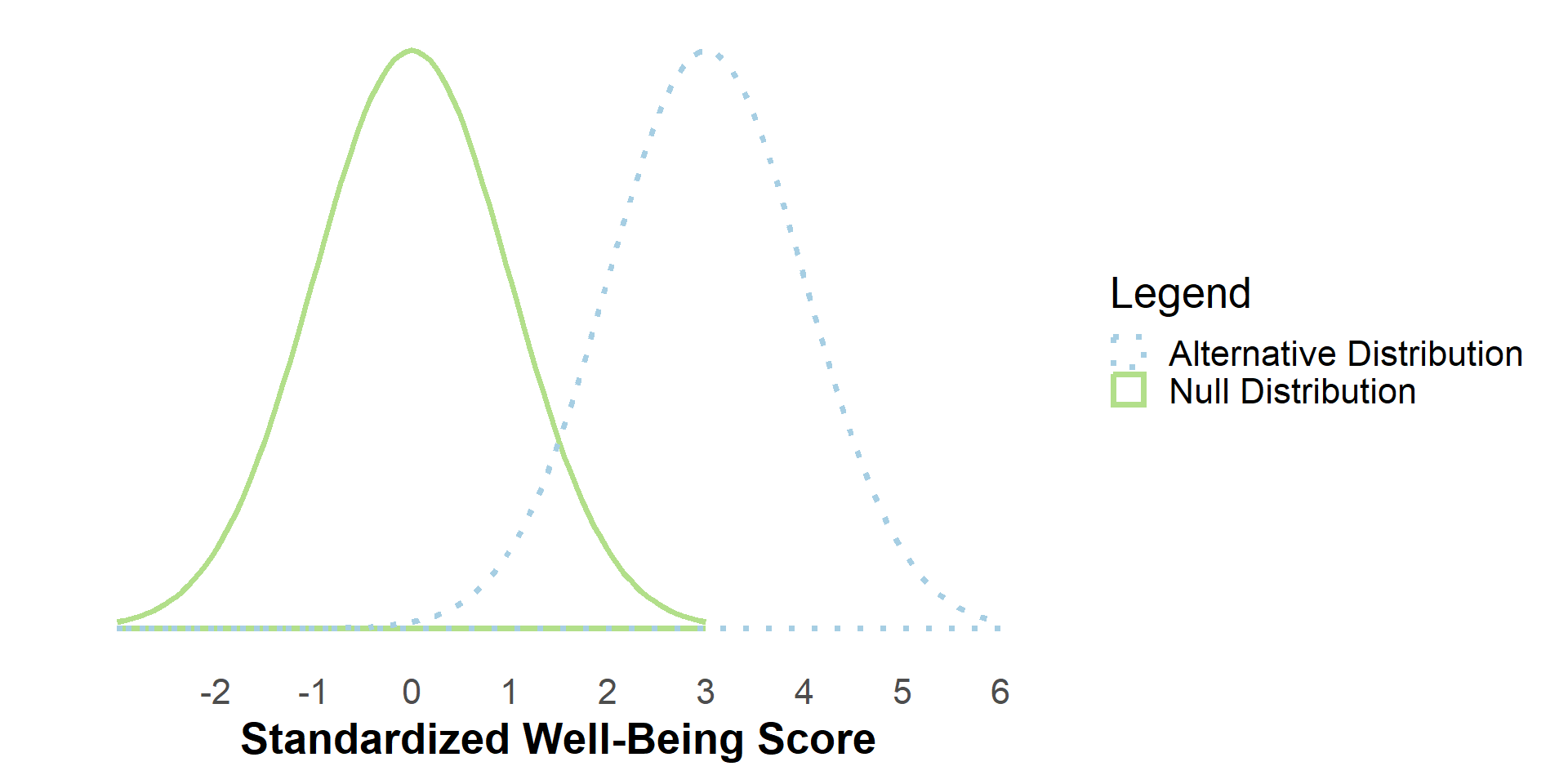
The Alternative Distribution

This is an alternative distribution - what the sampling distribution would look like if the population mean were higher than under \(H_0\).

The Alternative Distribution

But, in practice we do not know the true population distribution.

The Alternative Distribution(s)

To further complicate things, there are an infinite number of possible alternative distributions

The Null Distribution

For this reason, it is typical to conduct inference by just considering the null distribution.

Test your Knowledge

Scroll down to test your knowledge of Null and Alternative Hypotheses.

Alternatively, advance to continue with the module.

Null & Alternative Hypotheses

  • What do the null and alternative hypotheses represent?

In this example, the null hypothesis (\(H_0\)) represents the idea that the population of university students have mean well-being scores of 50; any difference between our sample mean and the hypothesized value of 50 could be just due to chance.

The alternative hypothesis (\(H_1\) or \(H_a\)) represents the idea that the population of university students have mean well-being scores that are different from 50. But, the exact mean of university well-being is not specified.

Null & Alternative Hypotheses

  • Why do we rarely know what the true population distribution is?

Because any attribute in our population can only be estimated/approximated based on sample data. If we could obtain the entire population’s data, then use of inferential statistics is not necessary.

  • Why are there an infinite number of alternative distributions?

The alternative hypothesis does not specify a specific value for the mean parameter, it only states that the mean is different than that stated under \(H_0\).

The Big Question

So, how do we know if this sample mean came from the null distribution, or some other distribution?

Null Hypothesis Significance Testing

  • A common approach to answering this question is Null Hypothesis Significance Testing

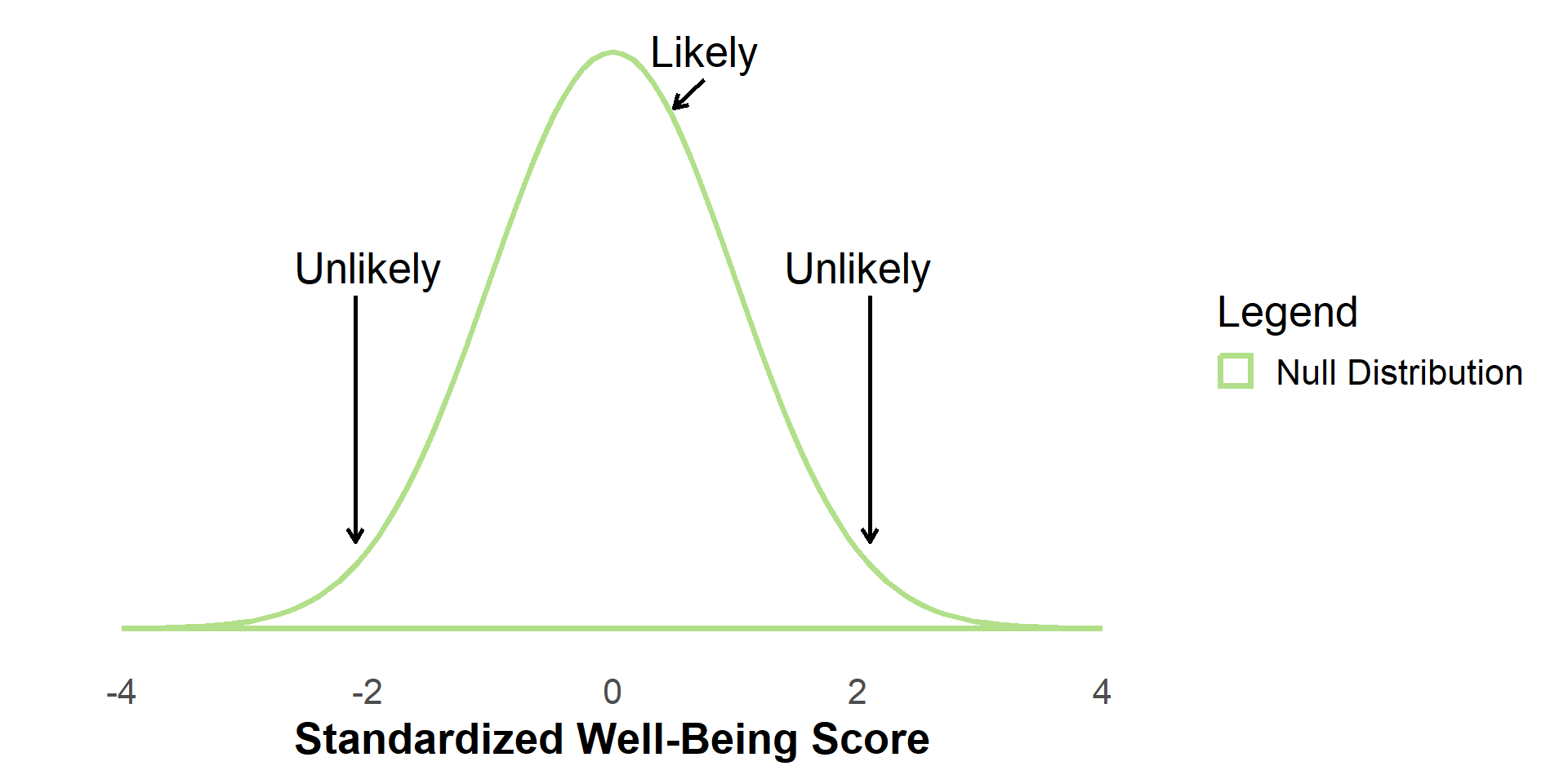
  • Under this approach, we define what values of the sample mean (or test statistic) would be unlikely if \(H_0\) were true

Null Hypothesis Significance Testing

We examine two equivalent ways of conducting null hypothesis significance testing:

  1. Compare the critical value of a test statistic (determined in part by \(\alpha\)) to the obtained test statistic from our sample
  1. Compare \(\alpha\) to the obtained \(p\)-value

Both require choosing \(\alpha\)

α

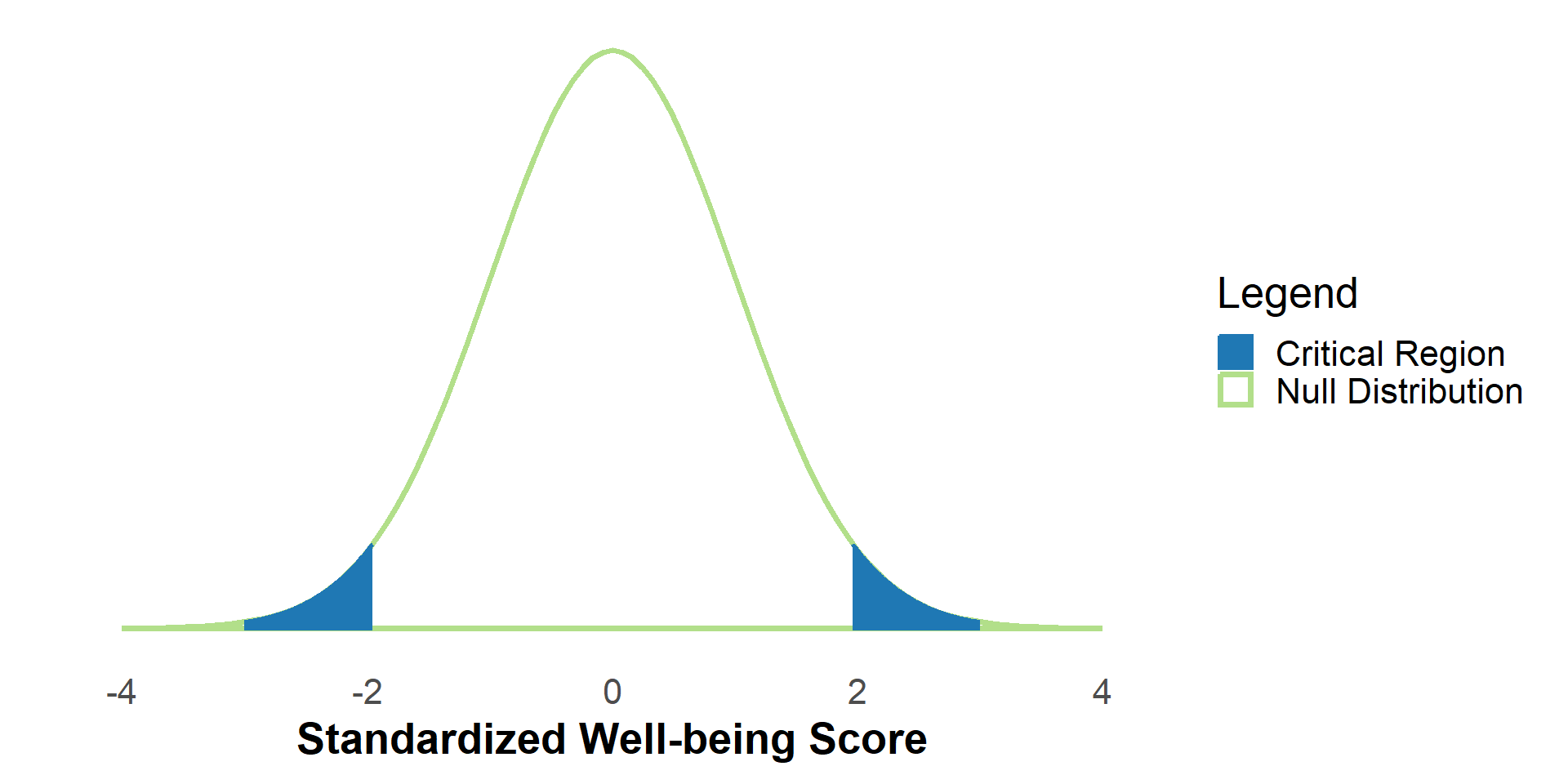
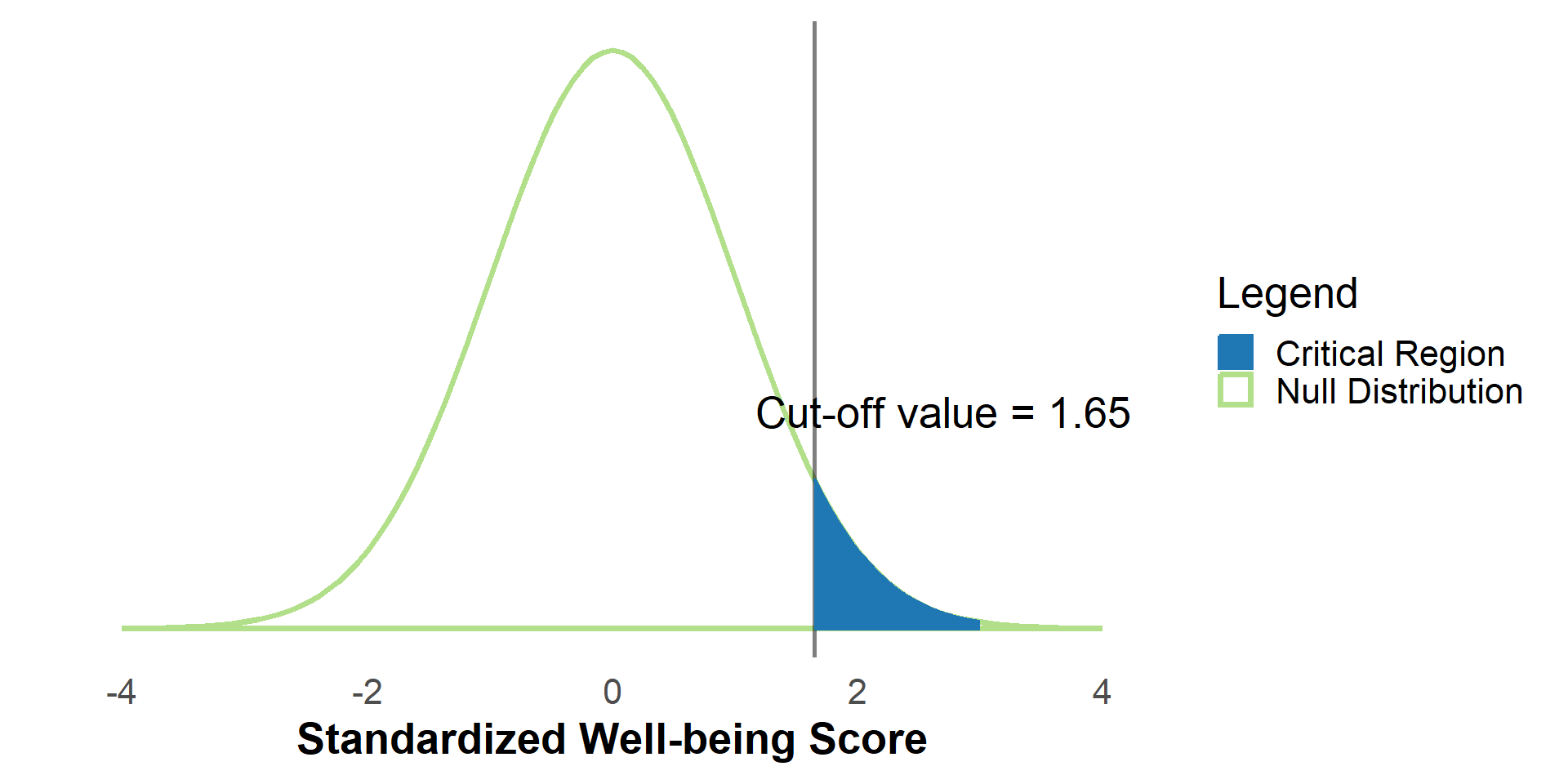
\(\alpha\) (“alpha”) is the proportion in the tail of the null distribution that we deem as unlikely to occur under \(H_0\)

  • The critical region are values of the null distribution that correspond to \(\alpha\)

Here, our alpha value is set to .05, meaning our critical region covers 5% of the distribution.

Critical value (one-tailed)

Every \(\alpha\) value has a corresponding cut-off value that divides the critical region from the rest of the distribution.

We often call this cut-off value a critical value for the test statistic.

In this case, 5% of the values under the distribution are greater than or equal to 1.65.

Critical value (one-tailed)

#| '!! shinylive warning !!': |
#|   shinylive does not work in self-contained HTML documents.
#|   Please set `embed-resources: false` in your metadata.
#| standalone: true
#| panel: fill
#| fig-align: center
#| viewerHeight: 600
library(tibble)
library(munsell)
library(shiny)
library(ggplot2)

ui <- fluidPage(
  plotOutput(outputId = "alphaPlot"),
  sliderInput("alpha", "α:", min = .01, max = .49, value = .05, step = .01),
  radioButtons(
    "tails",
    "Tails:",
    c("1 Tail (Upper)" = "onetail_upper", "1 Tail (Lower)" = "onetail_lower"),
    inline = T
  )
)

server <- function(input, output){
  theme_minimalism <- function(base_size = 20) {
    theme_minimal(base_size = base_size) + # ggplot's minimal theme hides many unnecessary features of plot
      theme(
        # make modifications to the theme
        panel.grid.major.y = element_blank(), # hide major grid for y axis
        panel.grid.minor.y = element_blank(), # hide minor grid for y axis
        panel.grid.major.x = element_blank(), # hide major grid for x axis
        panel.grid.minor.x = element_blank(), # hide minor grid for x axis
        #text=element_text(size=14),           # font aesthetics
        #axis.text=element_text(size=12),
        #axis.title=element_text(size=14,face="bold"))
        axis.title = element_text(face = "bold")
      )
  }
  
  output$alphaPlot <- renderPlot({
    lower <- -3
    upper <- 3
    mu <- 0
    #beta_value <- reactive({pnorm(-qnorm(input$alpha/2,mean=mu)) - pnorm(qnorm(input$alpha/2,mean=-mu))})
    #power <- 1-beta_value()
    stdev <- 1
    critval <- switch(
      input$tails,
      "onetail_upper" = reactive({
        qnorm(input$alpha, mean = 0, sd = 1, lower.tail = F)
      }),
      "onetail_lower" = reactive({
        qnorm(input$alpha, mean = 0, sd = 1)
      })
    )
  
    #critval <- 0 + critval()
  
    ggplot(data = data.frame(x = c(lower, upper)), aes(x)) +
      stat_function(
        fun = dnorm, #The Null Distribution
        args = list(mean = 0, sd = 1),
        geom = "area",
        linetype = "solid",
        fill = NA,
        size = 1.25,
        color = "#b2df8a",
        xlim = c(lower, upper)
      ) +
      stat_function(
        fun = dnorm, # The critical region
        args = list(mean = mu, sd = stdev),
        geom = "area",
        fill = "#1f78b4",
        color = "#1f78b4",
        alpha = .5,
        xlim = switch(
          input$tails,
          {
            "onetail_lower" = c(
              lower,
              qnorm(input$alpha, mean = 0, sd = 1, lower.tail = T)
            )
          },
          "onetail_upper" = c(
            qnorm(input$alpha, mean = 0, sd = 1, lower.tail = F),
            upper
          )
        )
      ) +
      #annotate("text",x=Inf,y=Inf, label = paste0("Power = ", round(power,3)), vjust = 1, hjust = 1) +
      annotate(
        "text",
        x = 2.5,
        y = .4,
        label = paste0("Critical Value = ", round(critval(), 3)),
        vjust = 1,
        hjust = 1
      ) +
      #Clears the y-axis label
      ylab("") +
      xlab("Standardized Well-being Score") +
      #Sets the x axis ticks to cover the whole plot
      scale_x_continuous(
        limits = c(lower, upper),
        breaks = seq(round(lower), round(upper), by = 1)
      ) +
      #Clears the y-axis ticks
      scale_y_continuous(breaks = NULL) +
      theme_minimalism()
  })
}

shinyApp(ui, server)

Try adjusting α. How does the critical value change?

Note that typically alpha values are set to .05 or .01.

Two-tailed tests

It’s more common not to specify a direction to the hypothesis when conducting a statistical test. We simply wish to test whether a population mean differs from \(H_0\).

The alternative hypothesis specified at the beginning of this presentation corresponds to this case:

\[H_a: \mu \ne 50\]

In this case, we use a two-tailed test.

\(\alpha\), Two-tailed tests

For two tailed-tests, our alpha value represents the combined percentage of the distribution in both tails of the distribution.

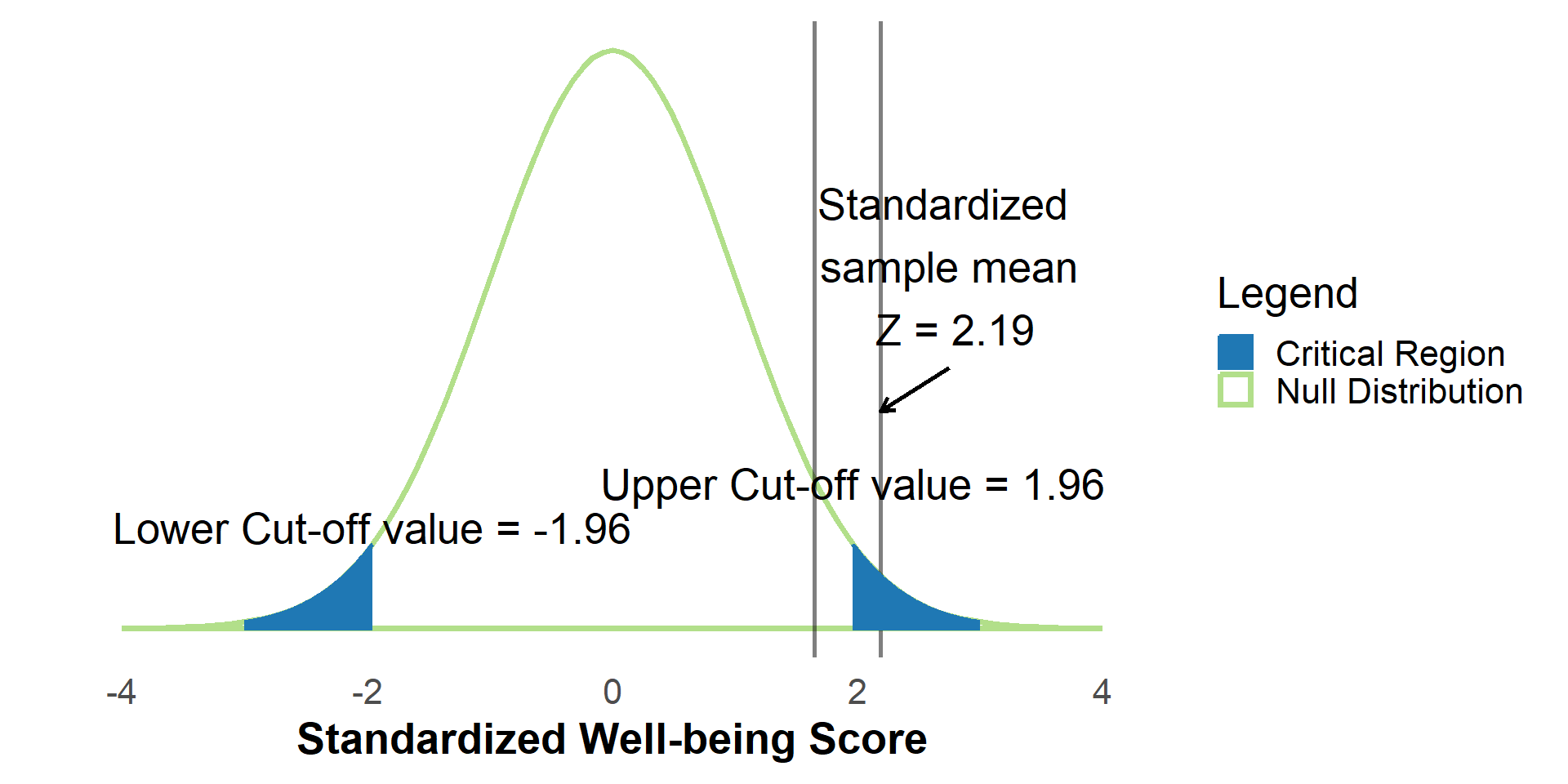
Here, our alpha value is .05, so the lower critical region covers 2.5% of the distribution, and the upper critical region covers 2.5% of the distribution.

The critical values dividing the lower and upper 2.5% of the distribution correspond to -1.96 and 1.96.

Critical values (two-tailed)

#| '!! shinylive warning !!': |
#|   shinylive does not work in self-contained HTML documents.
#|   Please set `embed-resources: false` in your metadata.
#| standalone: true
#| panel: fill
#| fig-align: center
#| viewerHeight: 600
library(tibble)
library(munsell)
library(shiny)
library(ggplot2)

ui <- fluidPage(
  plotOutput(outputId = "alphaPlotTwoTail"),
  sliderInput("alpha", "α:", min = .01, max = .99, value = .05, step = .01)  
)

server <- function(input, output){
  theme_minimalism <- function(base_size = 20) {
    theme_minimal(base_size = base_size) + # ggplot's minimal theme hides many unnecessary features of plot
      theme(
        # make modifications to the theme
        panel.grid.major.y = element_blank(), # hide major grid for y axis
        panel.grid.minor.y = element_blank(), # hide minor grid for y axis
        panel.grid.major.x = element_blank(), # hide major grid for x axis
        panel.grid.minor.x = element_blank(), # hide minor grid for x axis
        #text=element_text(size=14),           # font aesthetics
        #axis.text=element_text(size=12),
        #axis.title=element_text(size=14,face="bold"))
        axis.title = element_text(face = "bold")
      )
  }
  
  output$alphaPlotTwoTail <- renderPlot({
    lower <- -3
    upper <- 3
    mu <- 0
    #beta_value <- reactive({pnorm(-qnorm(input$alpha/2,mean=mu)) - pnorm(qnorm(input$alpha/2,mean=-mu))})
    #power <- 1-beta_value()
    stdev <- 1
  
    ggplot(data = data.frame(x = c(lower, upper)), aes(x)) +
      stat_function(
        fun = dnorm, #The Null Distribution
        args = list(mean = 0, sd = 1),
        geom = "area",
        linetype = "solid",
        fill = NA,
        size = 1.25,
        color = "#b2df8a",
        xlim = c(lower, upper)
      ) +
      stat_function(
        fun = dnorm, # The upper critical region
        args = list(mean = mu, sd = stdev),
        geom = "area",
        fill = "#1f78b4",
        color = "#1f78b4",
        alpha = .5,
        xlim = c(qnorm(input$alpha / 2, mean = 0, sd = 1, lower.tail = F), upper)
      ) +
      stat_function(
        fun = dnorm, # The lower critical region
        args = list(mean = mu, sd = stdev),
        geom = "area",
        fill = "#1f78b4",
        color = "#1f78b4",
        alpha = .5,
        xlim = c(lower, qnorm(input$alpha / 2, mean = 0, sd = 1))
      ) +
      #annotate("text",x=Inf,y=Inf, label = paste0("Power = ", round(power,3)), vjust = 1, hjust = 1) +
      annotate(
        "text",
        x = 2,
        y = .2,
        label = paste0(
          "Critical Value = +/-",
          round(qnorm(input$alpha / 2, mean = 0, sd = 1, lower.tail = F), 3)
        ),
        vjust = 1,
        hjust = 1
      ) +
      scale_colour_manual(
        "Legend",
        values = c("Null Distribution" = "#b2df8a", "Critical Region" = "#1f78b4")
      ) +
      #Clears the y-axis label
      ylab("") +
      xlab("Well-Being Score") +
      #Sets the x axis ticks to cover the whole plot
      scale_x_continuous(
        limits = c(lower, upper),
        breaks = seq(round(lower), round(upper), by = 1)
      ) +
      #Clears the y-axis ticks
      scale_y_continuous(breaks = NULL) +
      theme_minimalism()
  })  
}

shinyApp(ui, server)

Try adjusting α. How does the critical value change?

Note that typically alpha values are set to .05 or .01.

Components of null hypothesis significance testing

At this point…

  • We choose \(\alpha\)
  • Our choice of \(\alpha\) implies a critical value for the null distribution under \(H_0\)

We do not require looking at the sample data to determine the above values.

Components of null hypothesis significance testing

Based on the sample data, we can compute…

  • The obtained test statistic
  • The \(p\)-value corresponding to the obtained test statistic

Over then next slides, we show how to perform inference regarding \(H_0\) by doing one of the following:

  1. Compare the critical value of a test statistic to the obtained test statistic from our sample
  1. Compare \(\alpha\) to the obtained \(p\)-value

Comparing critical value to obtained test statistic

Since every \(\alpha\) corresponds to a particular critical value, we can do inference by comparing the critical value to the obtained test statistic

  • If the obtained test statistic is more extreme than its critical value
    • We reject \(H_0\) because it is unlikely that this result would be observed if \(H_0\) were true
  • If the obtained test statistic is less extreme than its critical value
    • We fail to reject \(H_0\) because this result could reasonably be observed if \(H_0\) were true

Comparing critical value to obtained test statistic

In this case, the obtained test statistic of \(Z = 2.19\) is more extreme than the critical value (when \(\alpha=.05\)) of \(\pm 1.96\). This means we reject \(H_0\).

Comparing \(\alpha\) to the \(p\)-value

  • Essentially we ask ourselves: “If \(H_0\) is true, what’s the probability of getting a sample mean this extreme (or more extreme)?”

  • Equivalently: “If \(H_0\) is true, what’s the probability of getting an obtained test statistic (e.g., Z) this extreme (or more extreme)?”

  • This probability is the \(p\)-value associated with our test of \(H_0\)

Comparing \(\alpha\) to a \(p\)-value

  • If the \(p\)-value is smaller than \(\alpha\)
    • We reject \(H_0\) because it is unlikely that this result would be observed if \(H_0\) were true
  • If the \(p\)-value is greater than \(\alpha\)
    • We fail to reject \(H_0\) because this result could reasonably be observed if \(H_0\) were true

Comparing \(\alpha\) to a \(p\)-value

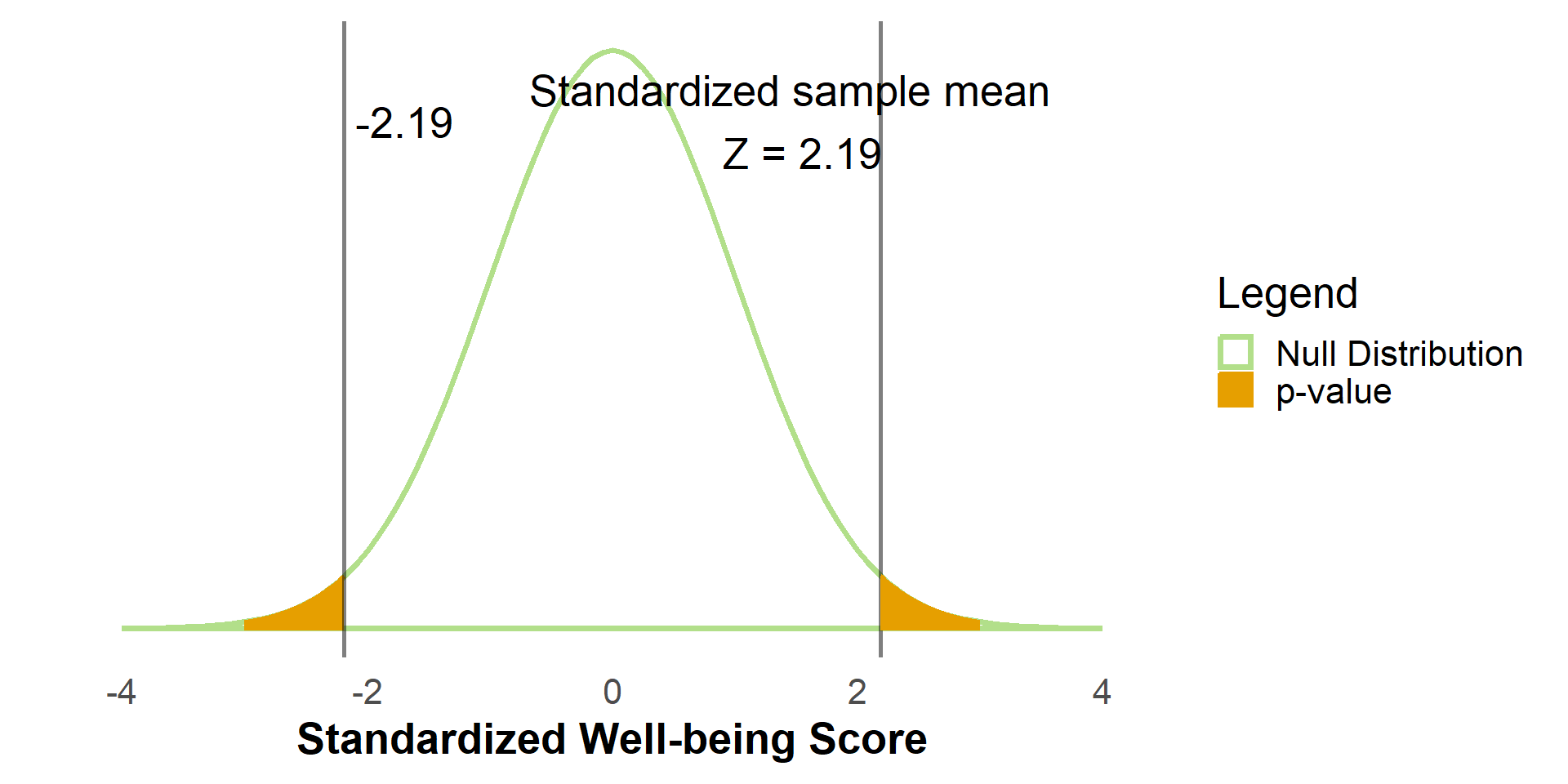
In this case, our observed test statistic is \(Z = 2.19\); Only 1.43% or .0143 of the distribution has a score of 2.19 or higher.

Since we are considering a two-tailed test, we also consider the proportion below \(-Z\), or below \(Z = -2.19\). This proportion is also 1.43% or .0143.

The \(p\)-value is therefore \(p = .0143 + .0143 = .0286\). Only 2.85% of the distribution corresponds to a Z statistic as or more extreme than 2.19 or -2.19.

.0286 is the \(p\)-value associated with our test of \(H_0\). It is the proportion beyond the obtained test statistic of \(Z=2.19\), two-tailed.

Since .0286 is below our \(\alpha\) value of .05, we reject \(H_0: \mu = 50\) and conclude that the mean of university students is (statistically) significantly different than 50.

Remaining questions

For the next few slides, consider the following questions:

  • What is the relationship between a \(p\)-value and its obtained test statistic?

  • What is the relationship between \(\alpha\) and its critical value?

  • What are the similarities and differences between \(\alpha\) and a \(p\)-value?

  • What are the similarities and differences between a critical value and an obtained test statistic?

Change the test statistic and \(p\)-value

  • Suppose \(\alpha = .05\) with a critical value of 1.65
  • What happens if the test statistic changes? (e.g., a different sample mean)
#| '!! shinylive warning !!': |
#|   shinylive does not work in self-contained HTML documents.
#|   Please set `embed-resources: false` in your metadata.
#| standalone: true
#| panel: fill
#| fig-align: center
#| viewerHeight: 600
library(tibble)
library(munsell)
library(shiny)
library(ggplot2)

ui <- fluidPage(
  plotOutput(outputId = "sampleMeanPlot1"),
  fluidRow(
    column(width = 4, 
      sliderInput(
      "sampleMean1",
      "Sample Mean (Standardized):",
      min = -2.6,
      max = 2.6,
      value = 2.4,
      step = .1
      )),
    column(width = 4,
      checkboxInput("shadealpha1", "Shade critical region (alpha)", value = TRUE),
      checkboxInput("shadep1", "Shade p-value area", value = FALSE))
  )
)

server <- function(input, output){
  theme_minimalism <- function(base_size = 20) {
    theme_minimal(base_size = base_size) + # ggplot's minimal theme hides many unnecessary features of plot
      theme(
        # make modifications to the theme
        panel.grid.major.y = element_blank(), # hide major grid for y axis
        panel.grid.minor.y = element_blank(), # hide minor grid for y axis
        panel.grid.major.x = element_blank(), # hide major grid for x axis
        panel.grid.minor.x = element_blank(), # hide minor grid for x axis
        #text=element_text(size=14),           # font aesthetics
        #axis.text=element_text(size=12),
        #axis.title=element_text(size=14,face="bold"))
        axis.title = element_text(face = "bold")
      )
  }
  
  output$sampleMeanPlot1 <- renderPlot({
    twotailed <- TRUE
    lower <- -3
    upper <- 3
    mu <- 0
    stdev <- 1
  
    if (twotailed) {
      prop <- .05 / 2
    } else {
      prop <- .05
    }
  
    plt <- ggplot(data = data.frame(x = c(lower, upper)), aes(x)) +
      stat_function(
        fun = dnorm, #The Null Distribution
        args = list(mean = 0, sd = 1),
        geom = "area",
        linetype = "solid",
        fill = NA,
        size = 1.25,
        color = "#b2df8a",
        xlim = c(lower, upper)
      ) +
      geom_vline(xintercept = input$sampleMean1, alpha = .5) +
      annotate(
        "text",
        x = input$sampleMean1 - .5,
        y = .26,
        label = paste0("Standardized sample mean \n Z = ", input$sampleMean1)
      )
  
    if (input$shadealpha1) {
      plt <- plt +
        stat_function(
          fun = dnorm, # The critical region
          args = list(mean = mu, sd = stdev),
          geom = "area",
          fill = "#1f78b4",
          aes(color = "Critical Region (alpha)"),
          #color="#1f78b4",
          alpha = .25,
          xlim = {
            c(qnorm(prop, mean = 0, sd = 1, lower.tail = F), upper)
          }
        )
      if (twotailed) {
        plt <- plt +
          stat_function(
            fun = dnorm, # The critical region
            args = list(mean = mu, sd = stdev),
            geom = "area",
            fill = "#1f78b4",
            aes(color = "Critical Region (alpha)"),
            #color="#1f78b4",
            alpha = .25,
            xlim = {
              c(lower, qnorm(prop, mean = 0, sd = 1, lower.tail = T))
            }
          )
      }
    }
  
    if (input$shadep1) {
      if (twotailed) {
        plt <- plt +
          stat_function(
            fun = dnorm, # The p-value
            args = list(mean = 0, sd = 1),
            geom = "area",
            linetype = "solid",
            fill = "#E69F00",
            aes(color = "p-value"),
            alpha = .35,
            xlim = c(abs(input$sampleMean1), 3)
          )
        plt <- plt +
          stat_function(
            fun = dnorm, # The p-value
            args = list(mean = 0, sd = 1),
            geom = "area",
            linetype = "solid",
            fill = "#E69F00",
            aes(color = "p-value"),
            alpha = .35,
            xlim = c(-3, -abs(input$sampleMean1))
          )
      } else {
        plt <- plt +
          stat_function(
            fun = dnorm, # The p-value
            args = list(mean = 0, sd = 1),
            geom = "area",
            linetype = "solid",
            fill = "#E69F00",
            aes(color = "p-value"),
            alpha = .35,
            xlim = c(input$sampleMean1, 3)
          )
      }
    }
  
    if (twotailed) {
      obtpval <- pnorm(
        abs(input$sampleMean1),
        mean = mu,
        sd = stdev,
        lower.tail = F
      ) *
        2
      sig <- ifelse(obtpval < .05, "Significant", "Not Significant (n.s.)")
      plt <- plt +
        annotate(
          "text",
          x = 2.3,
          y = .37,
          label = paste0(sig, ",\n p = ", round(obtpval, 3)),
          vjust = 1,
          hjust = 1
        )
    } else {
      plt <- plt +
        annotate(
          "text",
          x = 2.3,
          y = .37,
          label = paste0(
            if (
              input$sampleMean1 > qnorm(prob, mean = 0, sd = 1, lower.tail = F)
            ) {
              "Significant"
            } else {
              "Not Significant (n.s.)"
            },
            ",\n p = ",
            round(
              pnorm(input$sampleMean1, mean = mu, sd = stdev, lower.tail = F),
              3
            )
          ),
          vjust = 1,
          hjust = 1
        )
    }
  
    plt <- plt +
      #Clears the y-axis label
      ylab("") +
      xlab("Well-Being Score") +
      #Sets the x axis ticks to cover the whole plot
      scale_x_continuous(
        limits = c(lower, upper),
        breaks = seq(round(lower), round(upper), by = 1)
      ) +
      #Clears the y-axis ticks
      scale_y_continuous(breaks = NULL) +
      theme_minimalism()
  
    if (input$shadep1) {
      plt <- plt +
        scale_colour_manual(
          "Legend",
          values = c(
            "Null Distribution" = "#b2df8a",
            "Critical Region (alpha)" = "#1f78b4",
            "p-value" = "#E69F00"
          )
        )
    } else {
      plt <- plt +
        scale_colour_manual(
          "Legend",
          values = c(
            "Null Distribution" = "#b2df8a",
            "Critical Region (alpha)" = "#1f78b4"
          )
        )
    }
    plt
    #ggplotly(plt)
  })  
}

shinyApp(ui, server)
Change \(\alpha\) and the critical value

  • Suppose \(Z = 1.25\) is fixed (e.g., we consider only one dataset)
  • How would the researcher’s decision about \(H_0\) change with a different \(\alpha\) (and critical value)? (note that \(\alpha\) is rarely above .05)
#| '!! shinylive warning !!': |
#|   shinylive does not work in self-contained HTML documents.
#|   Please set `embed-resources: false` in your metadata.
#| standalone: true
#| panel: fill
#| fig-align: center
#| viewerHeight: 550
library(tibble)
library(munsell)
library(shiny)
library(ggplot2)

ui <- fluidPage(
  plotOutput(outputId = "alphaPlot1"),
  fluidRow(
    column(width = 4,
      sliderInput("alphaPlotVal", "α:", min = .01, max = .99, value = .05, step = .01)),
    column(width = 4,
      checkboxInput("shadealpha2", "Shade critical region (alpha)", value = TRUE),
      checkboxInput("shadep2", "Shade p-value area", value = FALSE))
  )
)

server <- function(input, output){
  #library(plotly)
  theme_minimalism <- function(base_size = 20) {
    theme_minimal(base_size = base_size) + # ggplot's minimal theme hides many unnecessary features of plot
      theme(
        # make modifications to the theme
        panel.grid.major.y = element_blank(), # hide major grid for y axis
        panel.grid.minor.y = element_blank(), # hide minor grid for y axis
        panel.grid.major.x = element_blank(), # hide major grid for x axis
        panel.grid.minor.x = element_blank(), # hide minor grid for x axis
        #text=element_text(size=14),           # font aesthetics
        #axis.text=element_text(size=12),
        #axis.title=element_text(size=14,face="bold"))
        axis.title = element_text(face = "bold")
      )
  }
  
  output$alphaPlot1 <- renderPlot({
    twotailed <- TRUE
    testval <- 1.25
    lower <- -3
    upper <- 3
    mu <- 0
    stdev <- 1
  
    if (twotailed) {
      crit <- qnorm(input$alphaPlotVal / 2, mean = 0, sd = 1, lower.tail = F)
    } else {
      crit <- qnorm(input$alphaPlotVal, mean = 0, sd = 1, lower.tail = F)
    }
  
    plt <- ggplot(data = data.frame(x = c(lower, upper)), aes(x)) +
      stat_function(
        fun = dnorm, #The Null Distribution
        args = list(mean = 0, sd = 1),
        geom = "area",
        linetype = "solid",
        fill = NA,
        size = 1.25,
        color = "#b2df8a",
        xlim = c(lower, upper)
      ) +
      geom_vline(xintercept = testval, alpha = .5) +
      annotate(
        "text",
        x = testval - .5,
        y = .26,
        label = paste0("Standardized sample mean \n Z = 1.25")
      )
  
    if (input$shadealpha2) {
      plt <- plt +
        stat_function(
          fun = dnorm, # The critical region
          args = list(mean = mu, sd = stdev),
          geom = "area",
          fill = "#1f78b4",
          aes(color = "Critical Region (alpha)"),
          #color="#1f78b4",
          alpha = .25,
          xlim = {
            c(crit, upper)
          }
        )
      if (twotailed) {
        plt <- plt +
          stat_function(
            fun = dnorm, # The critical region
            args = list(mean = mu, sd = stdev),
            geom = "area",
            fill = "#1f78b4",
            aes(color = "Critical Region (alpha)"),
            #color="#1f78b4",
            alpha = .25,
            xlim = {
              c(lower, -crit)
            }
          )
      }
    }
  
    if (input$shadep2) {
      plt <- plt +
        stat_function(
          fun = dnorm, # The p-value
          args = list(mean = 0, sd = 1),
          geom = "area",
          linetype = "solid",
          fill = "#E69F00",
          aes(color = "p-value"),
          alpha = .35,
          xlim = c(testval, upper)
        )
      if (twotailed) {
        plt <- plt +
          stat_function(
            fun = dnorm, # The p-value
            args = list(mean = 0, sd = 1),
            geom = "area",
            linetype = "solid",
            fill = "#E69F00",
            aes(color = "p-value"),
            alpha = .35,
            xlim = c(lower, -testval)
          )
      }
    }
  
    if (twotailed) {
      obtpval <- pnorm(abs(testval), mean = mu, sd = stdev, lower.tail = F) * 2
      sig <- ifelse(
        obtpval < input$alphaPlotVal,
        "Significant",
        "Not Significant (n.s.)"
      )
      plt <- plt +
        annotate(
          "text",
          x = 2.3,
          y = .37,
          label = paste0(sig, ",\n p = ", round(obtpval, 3)),
          vjust = 1,
          hjust = 1
        )
    } else {
      plt <- plt +
        annotate(
          "text",
          x = 2.3,
          y = .37,
          label = paste0(
            if (testval > crit) {
              "Significant"
            } else {
              "Not Significant (n.s.)"
            },
            ",\n p = ",
            round(pnorm(abs(testval), mean = mu, sd = stdev, lower.tail = F), 3)
          ),
          vjust = 1,
          hjust = 1
        )
    }
  
    plt <- plt +
      #Clears the y-axis label
      ylab("") +
      xlab("Well-Being Score") +
      #Sets the x axis ticks to cover the whole plot
      scale_x_continuous(
        limits = c(lower, upper),
        breaks = seq(round(lower), round(upper), by = 1)
      ) +
      #Clears the y-axis ticks
      scale_y_continuous(breaks = NULL) +
      theme_minimalism()
  
    if (input$shadep2) {
      plt <- plt +
        scale_colour_manual(
          "Legend",
          values = c(
            "Null Distribution" = "#b2df8a",
            "Critical Region (alpha)" = "#1f78b4",
            "p-value" = "#E69F00"
          )
        )
    } else {
      plt <- plt +
        scale_colour_manual(
          "Legend",
          values = c(
            "Null Distribution" = "#b2df8a",
            "Critical Region (alpha)" = "#1f78b4"
          )
        )
    }
    plt
    #ggplotly(plt)
  })  
  
}

shinyApp(ui, server)
Test your knowledge

Scroll down to test your knowledge of null hypothesis significance testing and its components (\(p\)-values, \(\alpha\), obtained test statistic, critical value)

Logic of hypothesis testing

  • When we say, “what distribution did the mean likely come from,” what are we really asking?

We want to know whether the observed mean from the sample (in our effort to estimate the population mean), is plausible under the null hypothesis. If it is not, we reject the null hypothesis in favor of the alternative hypothesis.

  • Is a single sample’s mean sufficient to tell us whether the alternative hypothesis is true?

No, hypothesis testing only evaluates whether the observed sample mean is likely or unlikely under the null hypothesis. It does not provide explicit information about the alternative hypothesis.

Components of hypothesis testing

  • Are \(\alpha\) and the critical value determined assuming \(H_0\) is true or the alternative hypothesis is true?

The researcher chooses \(\alpha\). Its critical value is determined assuming \(H_0\) is true. Each value of \(\alpha\) has a one-to-one relationship with a corresponding critical value.

  • Is a \(p\)-value the probability that \(H_0\) is true?

No, but this is a common misconception.

  • What does a \(p\)-value represent?

A \(p\)-value is the probability of observing a test statistic as extreme or more extreme than that for our sample, if \(H_0\) is true. In other words, it allows us to judge whether the observed data is incompatible with \(H_0\).

Components of hypothesis testing

  • If an observed mean (or its corresponding observed test statistic) exceeds the critical value, what conclusion can we draw?

We conclude that the sample mean is unlikely to have come from the null distribution, so we reject the null hypothesis.

  • If an observed mean (or its corresponding observed test statistic) exceeds the critical value, will its corresponding \(p\)-value be less than or greater than \(\alpha\)?

If an observed test statistic is greater than the critical value, its corresponding \(p\)-value will be less than \(\alpha\). Conversely, if an observed test statistic is less than the critical value, its corresponding \(p\)-value will be greater than \(\alpha\). In general, use of either the test statistic or \(p\)-value will yield the same conclusion.

Components of hypothesis testing

  • What determines the size of the critical region?

Choice of \(\alpha\). \(\alpha\) directly corresponds to the proportion of the null distribution that is in the critical region.

  • What determines the critical value (or cut-off for the critical region)?

The critical value, or cut-off/threshold, is primarily determined by \(\alpha\), but also requires knowledge of the null distribution.

Test your knowledge

  • Suppose we set \(\alpha = .05\). Later we collect data, calculate a test statistic, and the \(p\)-value = .08. Do we reject \(H_0\)? What conclusion do we make?

In this case \(p > \alpha\), so we do not reject \(H_0\).

  • Suppose we set \(\alpha = .01\). Later we collect data, calculate a test statistic, and the \(p\)-value = .03. Do we reject \(H_0\)? What conclusion do we make?

Again, \(p > \alpha\), so we do not reject \(H_0\).

  • Under which situation are we more likely to reject \(H_0\): When \(\alpha=.05\) or when \(\alpha = .10\)?

When \(\alpha = .1\), there are more possible values of the test statistic that could result in rejecting \(H_0\). Though note that \(\alpha=.05\) or \(\alpha=.01\) are more typical choices in practice than \(\alpha=.1\).

Looking ahead: Other test statistics

The same concepts in this module also apply to other kinds of hypothesis tests:

  • single sample \(t\)-tests, independent samples \(t\)-tests, repeated measures \(t\)-tests, Analysis of Variance (ANOVA), chi-square tests of independence, etc.
  1. The null hypothesis and desired test statistic imply a sampling distribution under \(H_0\)
  2. A choice of \(\alpha\) determines a cut-off value (i.e., critical value) under the sampling distribution for \(H_0\)
  3. The obtained test statistic from the sample can be compared to the critical value or
  4. The \(p\)-value can be compared to \(\alpha\)

Thank you!

This concludes the module on \(p\)-values

This module made available by the Small Grants for Teaching opportunity from the Association for Psychological Science (APS Fund for Teaching and Public Understanding of Psychological Science)

Authors: Jeremy Rappel, Mira Saad, Carl F. Falk, Jens Kreitewolf

Initial Evaluation: Domi Wong